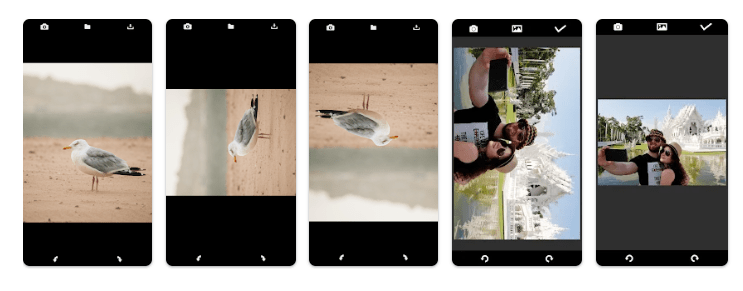
Sometimes a photo is saved in the wrong orientation. An image may appear sideways or upside down, especially when it has been transferred between devices or saved from another source. In such situations, a simple image rotation tool can be useful.
Rotate Image [Turn Image] is an Android application designed for rotating images. It provides a simple way to change the orientation of a picture without needing to use a full-featured photo editing application.
The app can be useful when you only need to rotate an image and do not want to use complicated editing tools.
What Is Rotate Image (Turn Image)?
Rotate Image [Turn Image] is a utility app for Android that focuses on changing the orientation of images.
The basic purpose of the app is simple. Users can select an image and rotate it so that it appears in the correct direction.
This can be useful for photos that were taken sideways, images that have been saved with the wrong orientation, or pictures that need a quick adjustment before sharing.
Main Features of Rotate Image [Turn Image]
1. Rotate Images
The main function of the application is image rotation.
If a picture is displayed sideways or upside down, you can use the app to change its orientation. This is useful when the original image does not appear correctly in the gallery or another application.
2. Simple Image Adjustment
If you only need to rotate a picture, using a dedicated tool can be easier than opening a large photo-editing application.
The app focuses on the rotation task, making it suitable for users who want to make a quick adjustment.
3. Correct Photo Orientation
Photos can sometimes have an incorrect orientation after being transferred, downloaded, or processed by another application.
Rotate Image [Turn Image] can be used to correct the way the picture is displayed.
4. Useful Before Sharing Images
You may notice an image is sideways only when you are preparing to send it to someone or upload it to social media.
Rotating the image before sharing can make it easier for others to view.
5. Handy for Everyday Image Tasks
Not every image requires professional editing. Sometimes you only need a small adjustment.
A dedicated rotation application can be useful for these quick image-related tasks.
How to Rotate an Image
Using a simple image rotation application generally involves only a few steps.
Step 1: Open the app.
Launch Rotate Image [Turn Image] on your Android device.
Step 2: Select an Image
Choose the picture that you want to rotate.
Step 3: Change the Orientation
Use the available rotation controls to turn the image in the required direction.
Step 4: Save the Result
After achieving the correct orientation, save the image according to the options available in the application.
The exact interface and available options may vary depending on the current version of the app.
Why Use a Separate Image Rotation App?
Modern smartphones often include basic photo-editing functions. However, a dedicated tool can still be useful when you want to perform one specific task.
Instead of opening a full photo editor and searching through multiple editing options, you can use an image rotation tool for a quick adjustment.
This can be especially convenient when you regularly work with images but do not need advanced editing features.
Rotate Images for Social Media
Social media platforms display images according to their orientation and format.
If an image is sideways, it may not look the way you intended when posted or shared.
Rotating the image before uploading can help make sure the picture is facing the correct direction.
The app can therefore be useful for people who frequently share photos through social media, messaging applications, or other online platforms.
Rotate Images for Documents
Images are also commonly used for documents.
For example, you may photograph a document using your phone and later discover that the image is sideways. Rotating it before adding it to a document, sending it by email, or sharing it with someone can make the file easier to read.
A simple rotation tool can help with this type of task.
Rotate Image App Details
| Feature | Details |
|---|---|
| App Name | Rotate Image [Turn Image] |
| Platform | Android |
| App Type | Image / Utility |
| Package Name | com.nakashimaakio.turnimage |
| Main Purpose | Rotate images |
| Availability | Google Play Store |
App features, compatibility, interface, and other information may change when the developer releases updates. It is always recommended to check the latest Google Play listing before installing.
Pros of Rotate Image [Turn Image]
- Focuses on a simple image-editing task
- Useful for correcting sideways images
- Can be helpful before sharing photos
- Suitable for quick image adjustments
- Easier than using a full photo editor for a simple rotation
Cons of Rotate Image [Turn Image]
- Designed mainly for image rotation rather than advanced photo editing
- Users looking for filters and professional editing tools may need another application
- Available features may vary depending on the app version and Android device
Who Can Use Rotate Image [Turn Image]?
The app can be useful for different types of Android users.
Everyday users can use it to correct the orientation of personal photos.
Students can rotate photos of notes or documents before submitting or sharing them.
Professionals can use it when preparing images for documents, presentations, or communication.
Social media users can correct image orientation before uploading pictures.
Anyone who occasionally receives or creates sideways images may find a simple rotation tool useful.
Is Rotate Image [Turn Image] Useful?
If your main requirement is to rotate a picture, a dedicated image rotation app can be convenient.
The application is focused on a specific task rather than trying to provide a complete photo-editing suite. This makes it suitable for users who want a quick way to correct image orientation.
However, if you regularly need cropping, filters, effects, retouching, or other advanced editing functions, you may need a more comprehensive photo editor.
Final Verdict
Rotate Image [ Turn Image] is an Android utility designed for a straightforward purpose: changing the orientation of images.
It can be useful when a photo appears sideways or upside down and needs a quick adjustment before it is saved, shared, or uploaded.
For users who are looking for a simple image rotation app for Android, Rotate Image [Turn Image] is worth exploring.
Download Rotate Image [Turn Image]
You can check the latest version, screenshots, ratings, compatibility, and other app information on Google Play:
Google Play:
https://play.google.com/store/apps/details?id=com.nakashimaakio.turnimage