The Problem & Solution
Have you ever dreamed of launching a successful YouTube faceless automation channel—covering history, finance, or scary stories—only to find yourself completely paralyzed by the endless grind of writing scripts, hunting for stock footage, editing clips, and recording voiceovers? Building a steady content library manually takes dozens of hours per video, causing most aspiring creators to burn out before they ever hit monetization. InVideo AI elegantly solves this high-friction creative bottleneck by condensing the entire YouTube automation pipeline into a conversational text interface on your phone, turning raw topic prompts into fully produced videos in minutes.
App Overview & Market Position
InVideo AI is a generative video production platform designed to automate the heavy lifting of multi-asset video editing. Developed by InVideo Inc., the application functions as an AI-powered executive director inside your pocket. Users simply type a conceptual prompt—specifying the target platform, tone, and pacing—and the engine automatically handles scriptwriting, generates humanlike narration, curates relevant background tracks, and pieces together context-aware stock video clips layered with animations and dynamic captions.
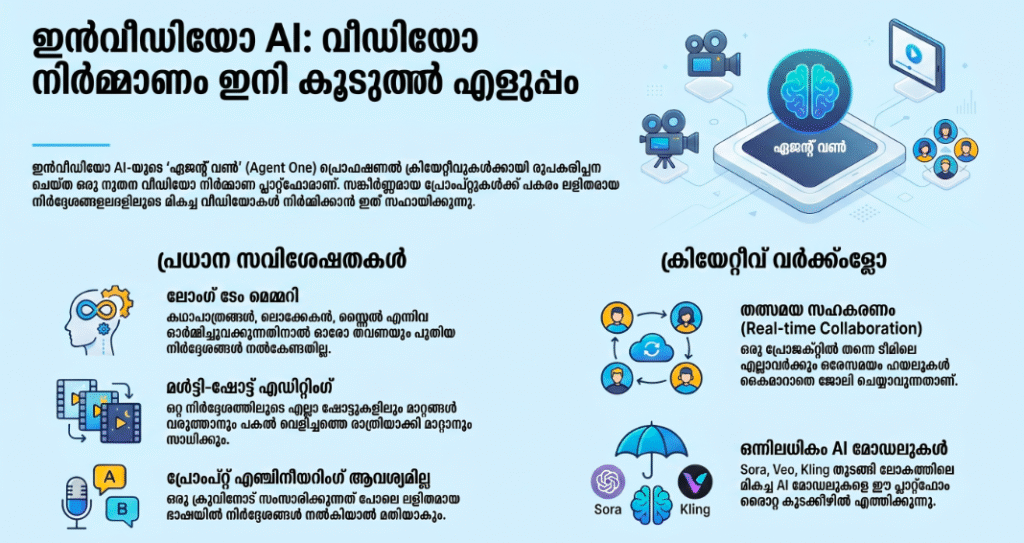
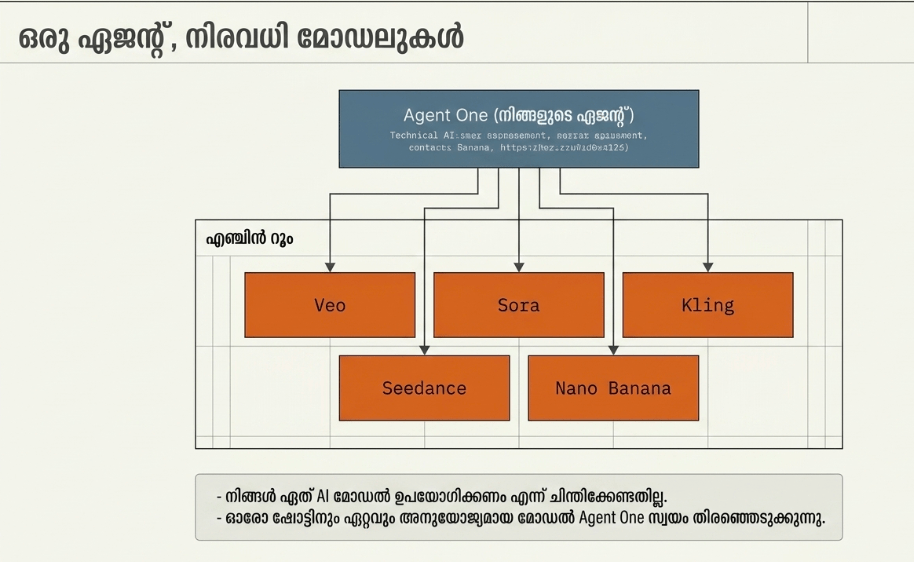
What secures InVideo AI’s dominant market position in the video automation sector is its workflow accessibility for non-technical creators. While traditional mobile video editors like CapCut or Splice require you to manually cut video tracks, align audio, and time transitions on a cramped timeline, InVideo AI functions as a text-first workflow. Its unique selling point is its multi-model video synthesis engine, which leverages leading video models (including OpenAI Veo and Kling AI) to blend generative AI footage with a massive stock media catalog. You can edit the final video simply by typing conversational instructions like “swap the third clip out for an ocean view” or “change the voiceover to a dramatic British accent,” bypassing manual timeline editing entirely.
Key Features at a Glance
- Conversational Video Prompting: Generate an entire multi-minute YouTube video complete with high-quality stock clips, transitions, script logic, and subtitles by entering a single sentence.
- Text-Based Video Editing: Modify your generated videos dynamically by typing natural language commands into a built-in AI editing assistant instead of cutting clips manually.
- Premium AI Voice Cloning: Select from a diverse library of hyper-realistic, humanlike AI narrators or clone your own voice to give your automated channel a signature, consistent sound.
- Direct Script-to-Scene Mapping: Auto-generates a clean, editable text script split neatly into individual visual scene cards for precise pacing and formatting controls.
User Data & Market Reach
| Platform | Star Rating | Total Reviews | Downloads |
|---|---|---|---|
| iOS App Store | 4.6 / 5 | ~27,000 | 5 Million+ Cumulative |
| Google Play Store | 4.4 / 5 | ~14,000 | 3 Million+ Cumulative |
Technical Performance Review
- Storage: Strikingly lightweight on your local hard drive at roughly 157MB, keeping your device clean since the heavy rendering computations occur entirely on remote GPU server farms.
- Data Usage: Exceptionally heavy; because the application streams uncompressed HD previews and pulls thousands of high-definition stock assets simultaneously, it can easily consume gigabytes of cellular data during a single editing session.
- Battery/Efficiency: Standard scripting and text adjustments run smoothly, but exporting final unwatermarked videos or processing continuous multi-asset prompt overhauls can accelerate local battery draw due to constant cloud data transfers.
Aklakstudio Advice: Always double-check your text scripts for minor AI typos or awkward pronunciations inside the “Edit Script” panel before letting the app execute a final export, as correcting post-export mistakes will burn additional monthly cloud credits.
Head-to-Head Comparison
| Attribute | InVideo AI Mobile | CapCut Mobile App |
|---|---|---|
| Creation Method | Text-to-Video generation (The AI builds the asset sequence automatically) | Manual multi-track editing (The user pieces together individual elements manually) |
| Stock Media Access | Built-in native integration with premium catalogs (iStock, Storyblocks) | Limited to free community templates and audio trending on TikTok |
| Automation Flow | High (Automates scripts, voice, subtitles, and scene selection simultaneously) | Low (Requires manual caption timing and manual voiceover recording) |
Best Practices & Safety
- Provide Detailed Direction: Avoid generic prompts like “make a video about space” and instead use hyper-specific formatting constraints like “create a 60-second YouTube Short detailing 3 disturbing facts about deep space using an intense cinematic narrator and high-contrast space visuals.”
- Audit the Fact Checking: Generative text structures can occasionally hallucinate fake historical dates or scientific parameters with high confidence, so make sure you manually verify all educational scripts before uploading them to YouTube.
- Keep an Eye on Credit Consumption: Remember that every generation prompt and conversational rewrite burns away a chunk of your tier-based monthly credits, even if the AI outputs an accidental visual artifact or mismatched clip.
Setup Guide
- Install the Official Mobile Application: Takes 1 min.
Locate and download the official “invideo AI: AI Video Generator” application via the iOS App Store or Google Play Store to protect your files from unsafe third-party copies. - Authenticate Your Creator Account: Takes 2 min.
Launch the app and complete your profile configuration using your Google, Apple, or existing desktop credentials to sync your generation histories seamlessly across platforms. - Select Your Targeted Video Formats: Takes 1 min.
Indicate whether your automated channel is targeting YouTube Shorts ($9:16$), traditional widescreen videos ($16:9$), or Instagram Reels to train your default home feed layout. - Prompt and Execute Your First Automation: Instant.
Type your detailed content idea directly into the conversational command field, select your target voice parameters, and tap generate to initiate the cloud rendering sequence.
Common Questions (FAQ)
Q: Can I safely monetize automated videos created by InVideo AI on YouTube?
A: Yes. InVideo AI uses fully licensed, royalty-free stock assets intended for commercial use. However, to pass YouTube’s strict monetization reviews, ensure you customize your scripts and add distinct value rather than uploading generic, low-effort loops.
Q: Does the app allow me to import my own custom recorded video clips?
A: Yes. While the AI automatically pulls matching stock footage by default, you can open the media editor panel to upload your own local phone clips and drop them into specific scenes.
Q: What happens if I am completely unhappy with the video the AI generated?
A: You do not need to rewrite the entire prompt from scratch. Simply use the command box at the bottom to type instructions like “Change the background music to hip-hop and make the script funnier,” and the AI will alter the existing draft.
Download the Official Version
- iOS Users: Download on the Apple App Store
- Android Users: Download on the Google Play Store
The Aklakstudio Final Verdict
InVideo AI is a remarkably powerful asset for modern content entrepreneurs looking to scale up their YouTube automation channels without getting bogged down in complex editing software. By letting you control multi-asset video timelines using natural conversational text, it compresses days of traditional scriptwriting, audio tracking, and clipping into a brief, approachable coffee-break task. It is an unmatched productivity tool for fast-moving side hustlers and faceless channel builders, though serious indie filmmakers who want pixel-perfect camera manipulation and advanced color-grading control will still require a heavy desktop editing setup.
Rating Scorecard
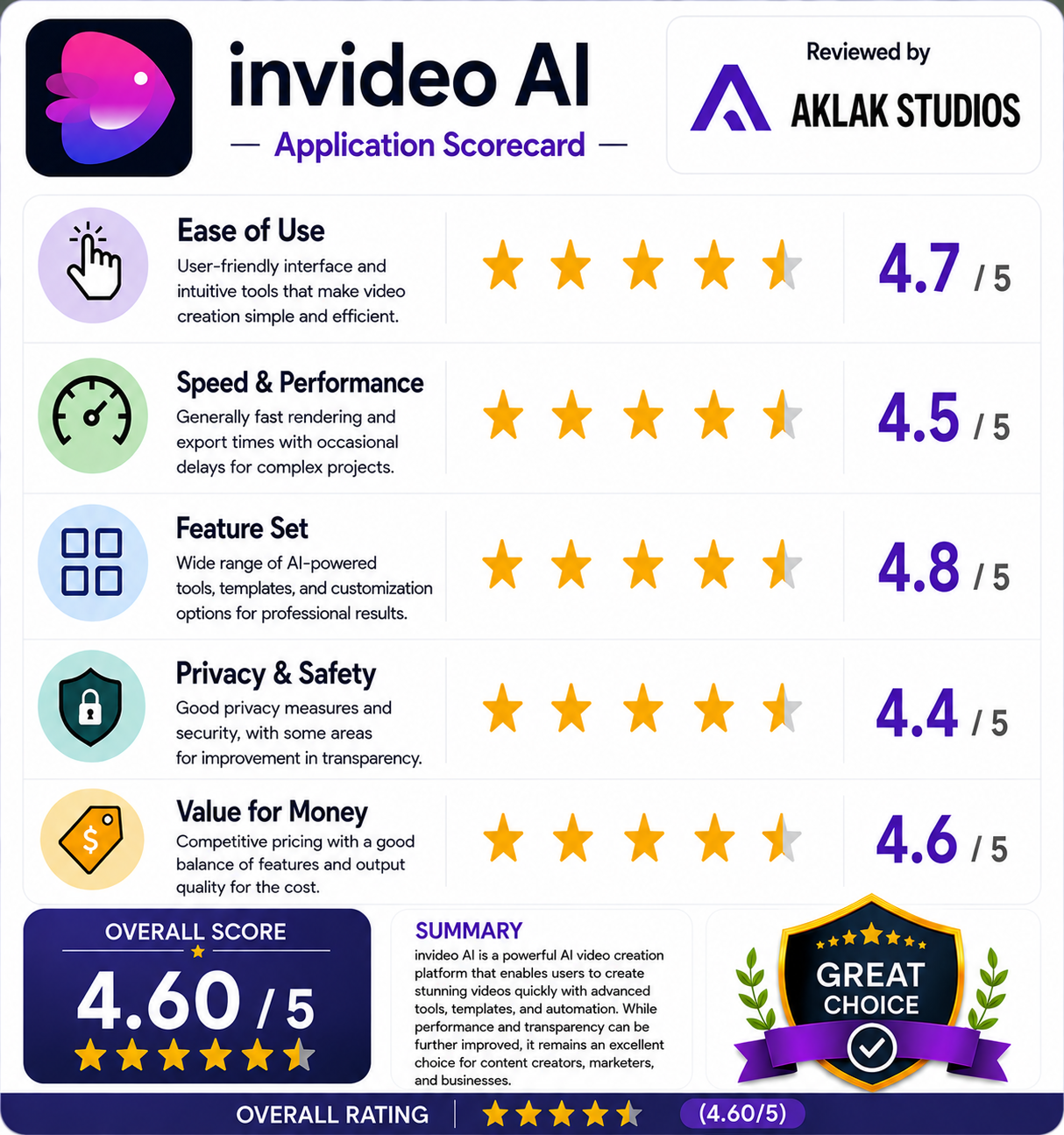
- Ease of Use: 4.8 / 5
- Speed & Performance: 4.5 / 5
- Feature Set: 4.7 / 5
- Privacy & Safety: 4.4 / 5
- Value for Money: 4.2 / 5