Having trouble accessing websites due to network restrictions or connectivity issues? Unicorn HTTPS is a privacy-focused network utility app designed to help improve browsing accessibility, enhance connection stability, and provide a smoother internet experience.
App Overview & Market Position
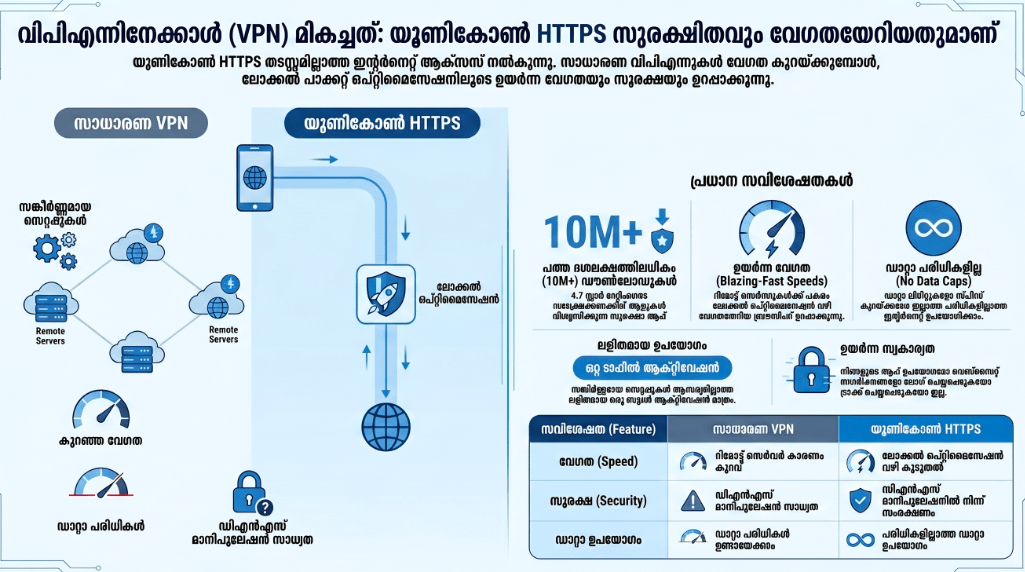
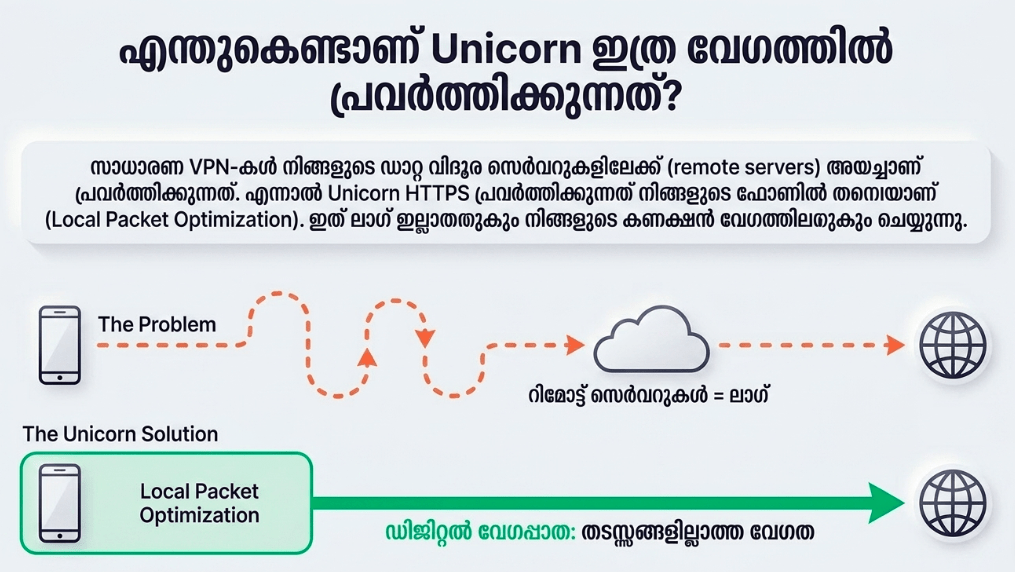
Developed by Unicorn Soft, Inc., Unicorn HTTPS is a dedicated utility tool built to bypass strict Server Name Indication (SNI) censoring and network filtering. Unlike a traditional security application that functions as a virtual middleman, this app uses an intelligent local packet fragmentation method. It modifies the data packets locally on your smartphone right before they leave your device, preventing external network firewalls from inspecting and intercepting your intended web address.
In a marketplace dominated by massive, subscription-heavy Virtual Private Networks (VPNs) like NordVPN or ExpressVPN, Unicorn HTTPS establishes its presence with a clear unique selling point: zero server routing, meaning absolutely no loss in internet connection speed. Because the app doesn’t send your data through an overseas proxy server, it offers completely unthrottled bandwidth. It occupies a distinct niche as a fast, entirely free, and ad-free utility tailored specifically for web browsing and bypassing network roadblocks without the complexity or weight of a full-scale VPN.
Key Features at a Glance
- SNI Field Protection: The app alters your outbound web requests locally, keeping deep packet inspections from eavesdropping on or blocking your web destinations.
- Zero Speed Reduction: Because your data traffic doesn’t hop through remote international servers, your network connection maintains its maximum native performance.
- Customizable DNS Settings: The interface lets you change your system domain name server to fast providers like Cloudflare (1.1.1.1) or Google (8.8.8.8) to improve overall stability.
- Universal Browser Compatibility: The background utility runs flawlessly across all major smartphone web browsers, including Google Chrome, Safari, Samsung Internet, and Firefox.
- Per-App Granular Control: The system settings allow you to choose exactly which mobile applications run through Unicorn’s packet protection and which ones bypass it completely.
User Data & Market Reach
| Platform | Star Rating | Total Reviews | Downloads |
| iOS App Store | 4.7 / 5 | Over 8,600 | 2M+ Estimated |
| Google Play Store | 4.4 / 5 | Over 90,000 | 10M+ Verified |
Technical Performance Review
- Storage: The installation footprint is incredibly minimal, requiring less than 18MB on iOS and roughly equivalent light storage on Android devices, ensuring it leaves plenty of room for your personal media files.
- Data Usage: Because it optimizes and fragments data packets locally rather than establishing an encrypted tunnel to an external data center, it uses zero auxiliary or background cellular data.
- Battery/Efficiency: The local processing engine is lightweight enough that it doesn’t cause background system lag, nor does it generate noticeable hardware heat or sudden battery drain.
Aklakstudio Advice: If you encounter a rare scenario where a restricted website still fails to load after turning on the protection, navigate into the app’s DNS menu and manually switch from your provider’s default option to the Cloudflare or Google DNS profile to resolve regional routing conflicts.
Head-to-Head Comparison
To understand how Unicorn HTTPS operates as a distinct network utility, we can look at its local data architecture compared against a mainstream communication application like WhatsApp Messenger.
| Attribute | Unicorn HTTPS App | WhatsApp Messenger |
| Primary Utility | Bypassing local network packet inspection and SNI website blocks. | End-to-end encrypted personal messaging, voice calling, and media sharing. |
| Data Routing | Processes data locally on-device; does not redirect your web traffic to a middleman server. | Routes all communication packages directly through centralized Meta cloud data centers. |
| Account Obligations | Requires zero user registration, email linkages, phone numbers, or profile generation. | Mandatory link to an active, verified mobile phone number and device profile. |
Best Practices & Safety
- Understand IP Limitations: Keep in mind that because Unicorn HTTPS does not hide or change your physical IP address like a VPN, it should not be relied on to mask your location or provide anonymity.
- Keep Per-App Rules Clean: If local banking or regional delivery apps begin to misbehave, use the “Per-App Settings” menu to exclude those specific apps from the Unicorn loop.
- Deactivate When Unused: Although its battery drain is practically unnoticeable, turn the switch off when you are on open, trusted home networks to prevent conflict with local printer sharing or media casting.
Setup Guide
1.Install the Application:Takes under 30 seconds.
Open your mobile app store, search for “Unicorn HTTPS,” and tap install to download the official software onto your device.
2.Launch to the Dashboard:Zero signup required.
Open the app to be greeted by the streamlined, single-button landing page without any registration screens.
3.Approve the Local Network Profile:Required for operation.
Tap the central activation button and agree to the operating system’s prompt to install a local configuration profile, which allows it to touch outbound packet structures.
4.Verify Secure Connection Status:Ready for use.
Ensure the status display changes to active, which indicates that your background web browsing is successfully protected from SNI filtering.
Common Questions (FAQ)
Does Unicorn HTTPS hide my online identity?
No. The app does not change your IP address or hide your location. It simply modifies local outbound data packets so that local network filters cannot see what website name you are trying to visit.
Is Unicorn HTTPS entirely free to use?
Yes, it is completely free of charge. The developers sustain the platform through their premium standalone ad-blocking software, meaning this utility features no hidden costs or intrusive pop-up advertisements.
Why does my phone say a VPN is connected when I turn it on?
To modify and fragment your outbound data packets locally, your mobile operating system forces the application to use its internal “VPN framework.” However, your web traffic is not being forwarded to any external VPN server.
Download the Official Version
- Android Devices: Get it on Google Play
- iOS Devices: Download on the Apple App Store
The Aklakstudio Final Verdict
The Unicorn HTTPS App is a stellar single-purpose utility that delivers on its core promise perfectly without any bloat, advertisements, or monthly fees. It is absolutely perfect for everyday students, casual internet users, and office workers who need a simple way to open blocked educational or recreational web resources without sacrificing their data speeds. However, because it does not mask your geographic location or scramble your real IP address, it is too simple for users looking for full privacy, anonymous downloading, or a way to spoof region-locked media streaming catalogs.
Rating Scorecard
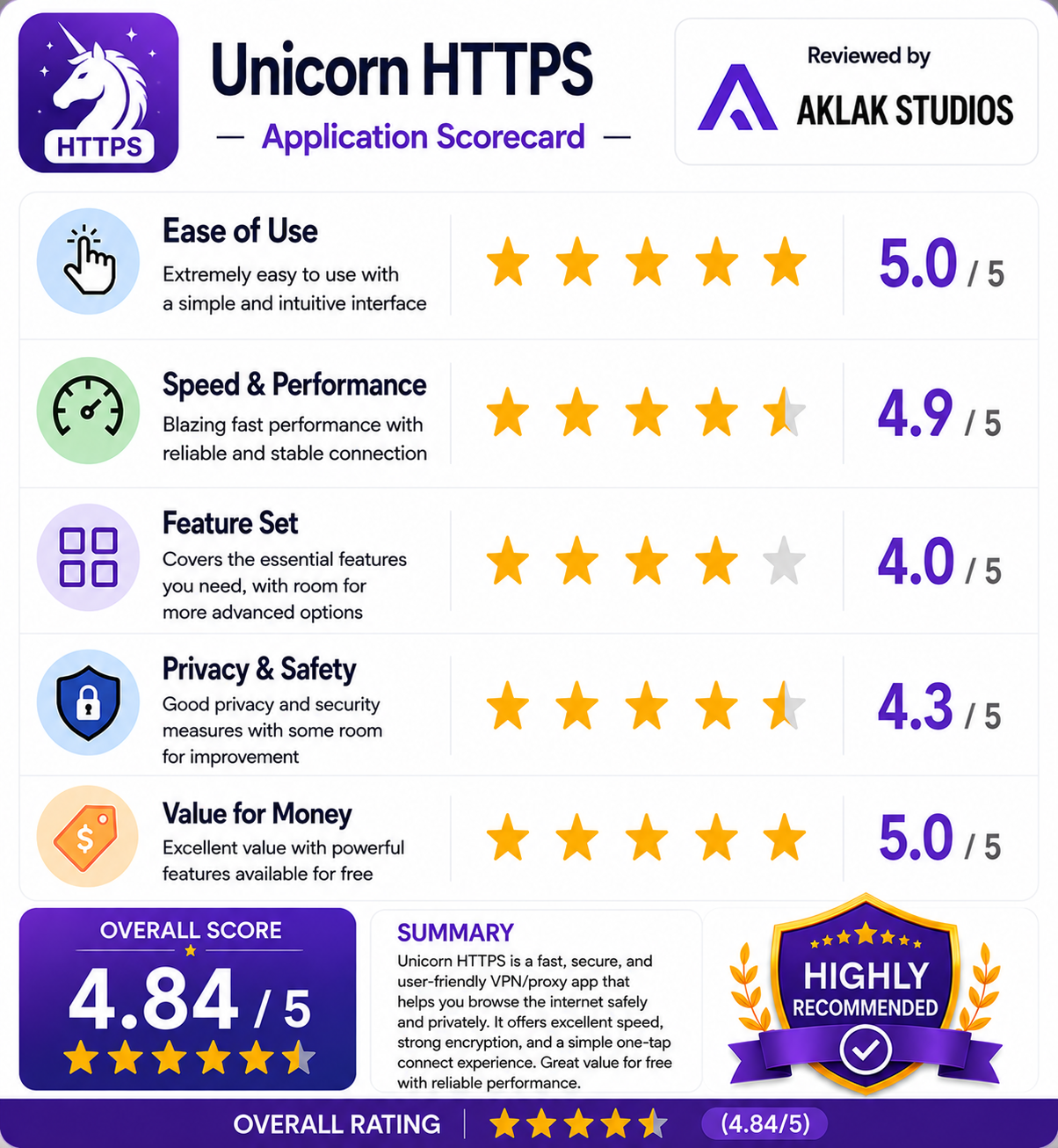
- Ease of Use: 5.0 / 5
- Speed & Performance: 4.9 / 5
- Feature Set: 4.0 / 5
- Privacy & Safety: 4.3 / 5
- Value for Money: 5.0 / 5
Overall Aklakstudio Score: 4.6 / 5