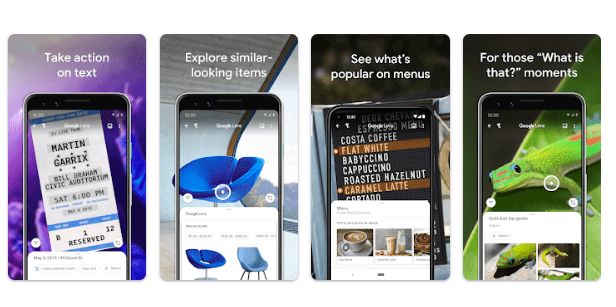
Google Lens is a visual search tool from Google that helps you find information using a photo or your phone’s camera. Instead of typing what you are looking for, you can point the camera at an object or upload an image and use Lens to search for related information. The app can also work with images already saved on your phone.
It can recognize and work with different types of content. You can use it to translate text, copy words from an image, identify plants and animals, learn about places, scan codes, and find similar products. Some features can also connect information from an image with actions such as saving contact details or adding an event to your calendar.
Google Lens can be useful for students, travelers, shoppers, and anyone who often wants to understand something they see. It is also helpful when typing a search manually would take more time.
Key Features
Search Using an Image
The main purpose of Google Lens is visual search. You can take a picture or select an existing image and use it to find information. Lens can return search results, similar images, and information about objects shown in the picture. You can also select only part of an image when you want to focus on one item.
Scan and Translate Text
Lens can recognize text in images and translate it. You can point your camera at written words or select text from an existing picture. It can also let you copy selected text, search for it, or listen to it being read aloud in supported situations.
This can be useful when reading signs, documents, posters, or other printed information.
Copy Text from Images
Another practical feature is text selection. After Lens recognizes words, you can select the section you need and copy it. Depending on the content, Lens can also offer actions such as calling a phone number, opening a website, sending an email, or using an address with Maps.
Identify Plants and Animals
Google Lens can help identify plants and animals from photographs. This gives users a simple way to search for information about something they see without already knowing its name.

Learn About Places
Lens can recognize landmarks, restaurants, storefronts, and other places. Depending on the available information, it can show details such as ratings, opening hours, and historical information.
Scan QR Codes and Barcodes
Lens can scan QR codes and barcodes. This gives it another everyday use beyond normal image searches.
Find Similar Products
If you see clothing, furniture, or home decor that you like, Lens can search for similar items. Shopping results are available in supported regions, including India.
Testing Experience
Google’s available information shows that Lens is designed around a straightforward camera-and-image search experience. You can take a picture, upload an image, or select an area of an image and then look at the results. The ability to select only part of a picture can be useful when an image contains several objects.
The menus and actions are focused on the image you provide. For example, selecting text can bring up actions such as copying, translating, searching, listening, or using recognized contact information. This makes Lens more useful than a basic image search in situations where you need to do something with the information you find.
However, the available source information does not provide a controlled phone test covering crashes, freezing, battery drain, heating, or long-term stability. It would therefore be misleading to claim that the app was personally tested for these areas based only on the available information.
Google also notes that some Google Lens features require an internet connection, and availability can differ by language and region. This is important because not every feature will necessarily work in the same way for every user.
Overall, the available information points to an app focused on quick visual searches and image-based actions rather than a complicated interface.
Privacy & Safety
Google Lens uses camera and image access for its main functions. On Android, Lens may request camera permission so it can recognize objects, translate text, and search for information. It can also request access to photos and media when you want to search saved pictures, screenshots, or other image files.
Some actions can involve other Google services. For example, Lens can use recognized business-card information to create a contact or save event information to a calendar when the relevant permissions are available.
Google also provides controls for Lens activity. Users can find and manage Google Lens activity through their Google Account activity settings.
Storage & Data Usage
Google Lens works with photos and camera images. Some features require an internet connection, so it should not be treated as a completely offline visual search tool.
The available information does not provide a specific storage requirement or detailed cache-growth figures. It is therefore better not to claim a particular storage size without checking the current device or Play Store information.
What I Liked
- Visual search makes it possible to search without typing everything.
- Text can be selected, copied, translated, and searched.
- It can identify plants and animals from images.
- It can provide information about places and landmarks.
- QR codes and barcodes can be scanned.
What Could Be Better
- Some features depend on an internet connection.
- Feature availability can vary by region and language.
- Not every Lens function is available in every situation.
- The available information does not confirm offline support for the full experience.
Frequently Asked Questions
What is Google Lens used for?
Google Lens lets you search for information using a photo or your camera. It can recognize objects, text, places, plants, animals, and other visual content.
Can Google Lens translate text?
Yes. Lens can translate text from images. You can point the camera at written content or use an existing image.
Can Google Lens copy text from a photo?
Yes. You can select recognized text and copy it. Other actions may also be available depending on what the text contains.
Can Google Lens identify plants and animals?
Yes. Google says Lens can help identify plants and animals from photographs.
Does Google Lens require the internet?
Some Google Lens features require an internet connection. Feature availability can also vary by region and language.
Aklak Studio Verdict
Google Lens is worth considering if you often need to search for something you can see but cannot easily describe with words. Its strongest point is the combination of visual search, text recognition, translation, object identification, place information, and code scanning.
It is particularly useful for people who regularly work with images, signs, printed text, products, or unfamiliar objects. However, users should remember that some functions depend on internet access and that feature availability can vary.
There is no need to add exaggerated claims to understand its usefulness. Based on the available information, Google Lens is a practical visual search tool for everyday image-based searches.
Final Scorecard
Ease of Use: ★★★★☆ (4.4/5)
Performance: ★★★★☆ (4.2/5)
Features: ★★★★★ (4.7/5)
Privacy & Safety: ★★★★☆ (4.0/5)
Value for Money: ★★★★☆ (4.5/5)
Overall Rating: ★★★★☆ (4.4/5)