
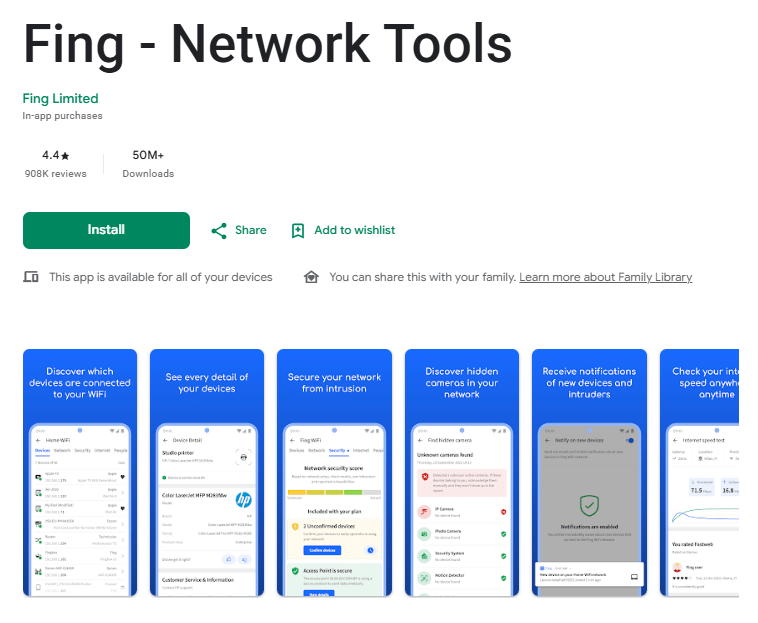
Fing is a network scanning and monitoring app designed to help users understand what is connected to their Wi-Fi or other networks. The mobile app can scan a network and show connected devices, along with information such as the device name, manufacturer, model, and IP address. It is designed for quick network checks from an Android or iOS phone.
The app can be useful when you want to check which devices are connected to your network or troubleshoot a connection problem. It also includes tools for checking internet performance and looking at network-related information.
Fing is aimed at both ordinary home users and people who need more detailed network information. The mobile version focuses on quick checks while Fing also offers desktop and agent options for users who want more detailed or continuous network monitoring.
Key Features
Network Scanning
The main feature of Fing is its network scanner. It can scan the Wi-Fi network you are connected to and show the devices it discovers. This gives you a quick view of what is currently connected.
For home users, this can be useful when you want to check whether a particular phone, computer, smart device, or other equipment is connected to your network.
Device Information
Fing provides details about detected devices, including information such as IP address, manufacturer, model, and device type. This can make it easier to understand the list of devices shown after a scan.
Instead of seeing only an unfamiliar network address, users can get additional information that helps identify the device.
Internet Speed Tests
Fing Mobile also includes network performance checks. You can use it to test the performance of the network you are connected to. Fing says the mobile app can be used for speed tests on different networks, including when you are away from home.
Network Security Checks
Fing provides security-related information about networks and connected devices. Its wider platform includes checks for network vulnerabilities, open ports, and unknown devices. Some advanced security and monitoring features are available through Fing’s other products and subscription plans.
Remote Network Access
When Fing Mobile is paired with Fing Desktop or Fing Agent through a Fing account, users can access network information remotely. This can be useful if you want to check information about your home or office network while using your phone elsewhere.
Testing Experience
Fing Mobile is designed around quick network checks rather than a complicated setup. The basic idea is simple: connect to a network, run a scan, and review the devices that appear. Fing describes the mobile app as a tool for quick, on-the-go network scanning.
The information shown after scanning is useful because the app does more than simply list network addresses. It can provide device details such as manufacturer, model, and type, which can make the results easier to understand.
Fing also states that its mobile scans are lightweight and do not affect phone performance or internet speed. This makes the app suitable for occasional network checks without requiring a separate computer.
However, the available source information does not provide a controlled phone test covering battery consumption, device heating, crashes, freezing, or long-term stability. Because of that, specific claims about those areas should not be made without additional testing.
The mobile app is mainly intended for quick checks. Users who need continuous monitoring have to use Fing Desktop or Fing Agent as the monitoring unit.
Overall, Fing Mobile makes the basic task of checking a network fairly direct. Its main strength is the amount of network and device information available from a phone.
Privacy & Safety
Fing uses network information to identify devices and provide network-related details. The app’s purpose requires access to the network you are connected to so that it can discover devices and provide information about them.
Fing also supports account-based syncing with its other products. According to Fing, signing in allows Fing Mobile to sync with Fing Desktop or Fing Agent and lets users view network information remotely.
Security features are available across Fing’s products, but not every advanced feature belongs to the basic mobile scanning experience. Fing states that some automated vulnerability scans, continuous threat detection, and advanced security alerts require subscription plans.
For this review, it is best to separate the basic mobile scanner from the more advanced monitoring and security functions offered by Fing’s wider platform.
Storage & Data Usage
Fing Mobile needs network access because its main purpose is to scan and analyze connected networks. It can be used on Wi-Fi networks while traveling, including networks outside your home.
The available information does not provide a specific storage requirement or detailed cache-growth figures. It also does not support describing the full app as an offline network scanner. Its main functions depend on access to the network being checked.
What I Liked
- Quickly scans connected networks.
- Shows useful information about discovered devices.
- Includes network performance testing.
- Can be used when connecting to different Wi-Fi networks.
- Supports syncing with Fing’s desktop and agent products.
What Could Be Better
- Continuous monitoring requires Fing Desktop or Fing Agent.
- Some advanced security functions require a subscription.
- The mobile app is more focused on scanning than full network management.
- Some features depend on the wider Fing platform.
Frequently Asked Questions
What is Fing used for?
Fing is used to scan networks and identify connected devices. It can also provide network and performance information.
Can Fing show who is connected to my Wi-Fi?
Yes. Fing can scan your Wi-Fi network and show the devices it discovers, along with information that can help identify them.
Can Fing test internet speed?
Yes. Fing Mobile includes network performance and speed testing tools.
Does Fing provide network security features?
Yes, Fing’s platform includes network security checks and alerts. However, some advanced security features are part of paid subscription plans.
Can Fing monitor my network all the time?
The mobile app is intended for quick scans. Continuous monitoring requires Fing Desktop or Fing Agent to act as the monitoring unit.
Aklak Studio Verdict
Fing is a useful choice for people who want a simple way to check their Wi-Fi network and see which devices are connected. Its mobile app is especially suitable for quick network scans and basic troubleshooting from a phone.
It may not be necessary for someone who rarely needs to check their network. Users looking for continuous monitoring or deeper security controls may also need Fing Desktop or Fing Agent rather than relying only on the mobile app.
The basic scanning tools are the main reason to try Fing. Advanced monitoring and security functions are available through other Fing products and subscription options.
Final Scorecard
Ease of Use: ★★★★☆ (4.4/5)
Performance: ★★★★☆ (4.3/5)
Features: ★★★★☆ (4.5/5)
Privacy & Safety: ★★★★☆ (4.0/5)
Value for Money: ★★★★☆ (4.2/5)
Overall Rating: ★★★★☆ (4.3/5)
Google Play: Fing – Network Scanner on Google Play