
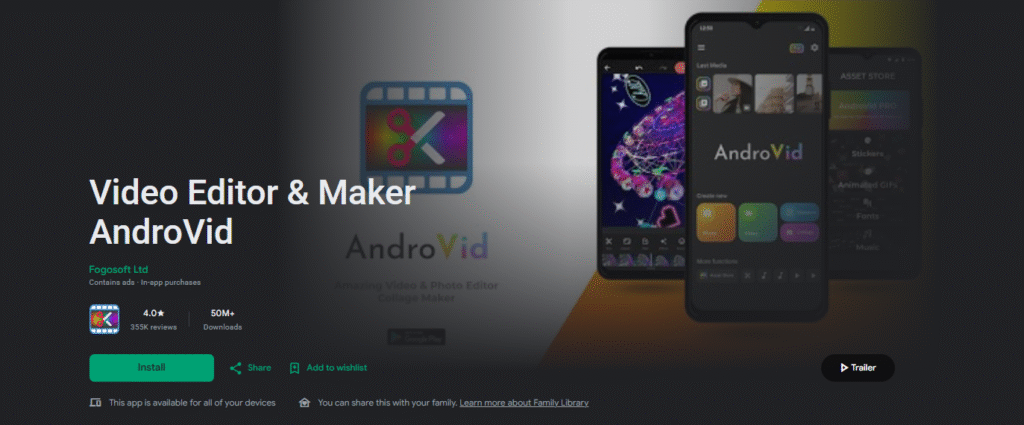
Video Editor & Maker AndroVid is an Android video editing application designed for users who want to edit videos directly on their smartphones. It provides tools for trimming, splitting, merging, adding music, applying effects, converting videos, and creating video projects.
AndroVid can be useful for beginners and casual creators who need basic video editing tools without using complicated desktop software. It is particularly suitable for editing personal videos, social media clips, slideshows, and short creative projects.
Google Play: Download Video Editor & Maker AndroVid
What Is AndroVid Video Editor?
AndroVid is a mobile video editor that focuses on common video editing tasks. Users can select videos from their device, edit individual clips, combine multiple files, add audio, and make other adjustments before saving or sharing the finished video.
Its straightforward approach makes it suitable for users who want to perform everyday video editing tasks on Android without learning complicated professional editing software.
Key Features of AndroVid
1. Trim Videos
AndroVid allows users to trim videos and remove unwanted sections. This is useful when you only want to keep the most important part of a recording.
For example, you can remove the beginning or end of a video before sharing it with friends or uploading it to social media.
2. Split Videos
Long videos can be divided into smaller sections using video-splitting tools. This can be useful when you want to work with individual scenes separately.
Splitting a video can also make it easier to create several short clips from one longer recording.
3. Merge Videos
AndroVid can be used to combine multiple video clips into a single project.
This can be useful for creating:
- Travel videos
- Family videos
- Birthday videos
- Short social media videos
- Event highlights
- Simple video compilations
4. Add Music
Adding background music can make a video more engaging. AndroVid provides audio-related editing options so users can combine video content with music.
When adding music to videos intended for public use, make sure you have permission to use the selected audio.
5. Video Effects
Creative effects can be used to change the appearance of a video. These effects can help make simple clips more visually interesting.
The number and availability of effects may depend on the current app version.
6. Text and Video Titles
Text can be useful for adding titles, captions, names, or other information to a video.
For social media videos, text overlays can also help communicate information when viewers are watching without sound.
7. Video Conversion
AndroVid also provides video conversion functionality. This can be useful when you need to change a video’s format or make a video more compatible with another device or application.
Conversion settings and supported formats can vary depending on the current version of the app.
8. Extract Audio
An audio extraction feature can be useful when you want to separate audio from a video file.
This can help when working with personal recordings or other content for which you have the appropriate rights.
9. Create Slideshows
Users can combine photos and other media to create simple slideshow-style videos.
This can be useful for birthdays, family memories, travel photos, and other personal occasions.
AndroVid for Social Media Videos
AndroVid can be useful for creating simple videos for social media platforms. Its basic editing tools allow users to cut unwanted sections, combine clips, add music, and personalize videos.
You can use it to create:
- Short videos
- Travel clips
- Family videos
- Birthday videos
- Photo slideshows
- Event highlights
- Simple social media content
For creators who need advanced effects, professional color grading, complex timelines, or sophisticated motion graphics, a more advanced video editor may be a better choice.
Testing Experience
AndroVid is primarily useful for straightforward editing tasks. Beginners can start with basic operations such as trimming and splitting before moving on to features such as merging, music, effects, and conversion.
The simple editing workflow can be convenient when you need to make quick changes to a video directly from your Android phone.
However, editing requirements vary considerably between users. Someone creating a simple family video may find the available tools sufficient, while a professional content creator may need more advanced timeline and audio controls.
Actual performance can depend on your Android device, video resolution, project length, available storage, and number of effects used. Specific export speeds, battery consumption, and processing times should therefore not be assumed without device-specific testing.
Privacy & Safety
Before installing AndroVid, check the current Google Play listing for its Data Safety information, permissions, advertisements, and in-app purchases.
App permissions and privacy disclosures can change when developers release new versions. Therefore, users should review the latest information available on Google Play rather than relying only on older descriptions or reviews.
When editing personal photos and videos, it is also a good idea to understand which media and device permissions the application requests.
Storage & Data Usage
Video editing can require considerable storage space. Original videos, temporary project files, edited versions, and exported videos may all occupy storage on your device.
High-resolution videos can take significantly more space than standard-resolution clips.
If you regularly edit large video files, keeping enough free storage on your phone can help prevent problems during editing and exporting.
What I Like About AndroVid
- Designed for Android video editing.
- Useful basic editing tools.
- Trimming and splitting are convenient for quick edits.
- Supports combining multiple clips.
- Music and audio options add flexibility.
- Useful for personal and social media videos.
- Suitable for beginners and casual video creators.
- Can handle several common video editing tasks from a smartphone.
What Could Be Better
- May not offer the same level of control as professional video editors.
- Advanced creators may need more sophisticated timeline features.
- Performance can vary depending on the Android device and video resolution.
- Users should check the latest Google Play listing for current features, ads, and in-app purchases.
Frequently Asked Questions
What is AndroVid Video Editor used for?
AndroVid is used for editing videos on Android devices. It can be useful for tasks such as trimming, splitting, merging, adding audio, applying effects, and creating simple video projects.
Is AndroVid good for beginners?
AndroVid can be suitable for beginners who mainly need basic video editing tools. Users who require professional-level editing may want to consider more advanced alternatives.
Can I merge videos with AndroVid?
Yes, AndroVid is designed to allow users to combine multiple video clips into a single project.
Can I add music to videos?
Yes, audio and music can be incorporated into video projects. Always make sure you have the necessary rights to use music in publicly shared content.
Can AndroVid create slideshow videos?
AndroVid can be used for simple photo and video compilation projects, making it suitable for creating slideshow-style videos.
Is AndroVid a professional video editor?
AndroVid is better suited to everyday mobile video editing and casual content creation. Professional editors who need advanced color correction, complex timelines, detailed audio mixing, or sophisticated effects may prefer dedicated professional editing software.
Aklak Studio Verdict
Video Editor & Maker AndroVid is a practical option for Android users who want to perform everyday video editing tasks directly from their smartphones.
Its focus on trimming, splitting, merging, music, effects, audio, conversion, and simple video creation makes it suitable for beginners, casual creators, and people editing personal videos.
If your main goal is to quickly edit family recordings, create short social media clips, or combine several videos into one project, AndroVid can be worth exploring.
For professional video production, however, you may want to compare it with editors that provide more advanced timeline, audio, color, and effects capabilities.
SEO Details for WordPress
Focus Keyphrase:
Video Editor & Maker AndroVid
Secondary Keywords:
- AndroVid Video Editor
- AndroVid video editor for Android
- AndroVid Video Maker
- AndroVid app
- Android video editing app
- AndroVid video editing app
- Video editor for Android
- Android video maker
- AndroVid review
SEO Title:
AndroVid Video Editor & Maker Review: Features & Tools
Meta Description:
AndroVid Video Editor & Maker review covering trimming, splitting, merging, music, effects and other useful video editing tools for Android.
Category:
Video Players & Editors → Video Editing
Suggested WordPress Tags:AndroVid, AndroVid Video Editor, Video Editor, Video Maker, Android Video Editor, Video Editing Apps, Video Effects, Video Editor for Android, Mobile Video Editor
Suggested URL Slug:androvid-video-editor-maker-review
Google Play: Download Video Editor & Maker AndroVid