Photographers often need more than a camera app. After taking photos, they may want a simple way to organize, store, share, and showcase their work.
SmugMug – Photography Platform is a photography-focused service that helps users manage and display their photographs. It can be useful for photographers who want to create online galleries and share their work with others.
The Android app provides access to SmugMug photography features from a mobile device, making it possible to view and manage photographs while away from a computer.
In this article, we explore SmugMug – Photography Platform, its main features, possible uses, advantages, limitations, and how to access it on Android.
What Is SmugMug?
SmugMug is an online photography platform designed for photographers and people who want to store, organize, share, and showcase photographs.
Unlike a traditional camera application, SmugMug focuses more on what happens after you take a photograph.
You can use a photography platform to organize your images into galleries and share selected photographs with friends, family, clients, or other viewers.
This makes it different from apps that are mainly designed for taking or editing photos.
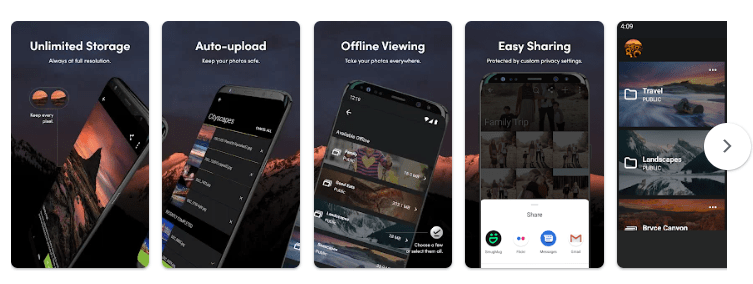
Key Features of SmugMug Photography Platform
1. Online Photo Galleries
One of the main purposes of SmugMug is creating online photo galleries.
A gallery gives you a dedicated place to display a collection of photographs.
For example, you can create separate galleries for:
- Weddings
- Family events
- Travel
- Nature photography
- Portraits
- Sports
- Events
- Professional projects
Organizing photographs into galleries makes it easier for viewers to find specific collections.
2. Showcase Your Photography
Photographers can use SmugMug as an online space to showcase their work.
Instead of sending individual image files to someone, you can organize photographs into galleries and provide access to the collection.
This can be useful for photographers who want to present their work in a more organized way.
A photography portfolio can also help you keep your best photographs together in one place.
3. Store and Organize Photos
Managing a large number of photographs can become difficult when images are spread across different folders and devices.
A photography platform can provide a more organized way to manage image collections.
You can arrange photographs into different galleries and categories according to the type of photography or project.
This can make it easier to find photographs later.
4. Share Photos
Photo sharing is another important part of SmugMug.
You can share your photographs with other people rather than sending large numbers of individual image files.
This can be convenient for photographers working with clients or sharing photographs from events.
For example, after a wedding or family event, photographs can be organized into a gallery that viewers can access.
5. Mobile Access
The SmugMug Android app gives users access to their photography platform from a mobile device.
Mobile access can be useful when you want to view photographs, check galleries, or manage your photography collection while away from your computer.
Having a mobile application makes it easier to stay connected with your photo collection.
6. Photography Portfolio
Photographers who want to create an online portfolio can use a dedicated photography platform.
A portfolio allows you to select your strongest photographs and present them together.
You can organize your portfolio by photography style, project, location, or subject.
This can be useful for photographers who want to share their work with potential clients or simply create an online collection.
SmugMug for Professional Photographers
Professional photographers often have thousands of images from different assignments.
Keeping these images organized can be challenging.
SmugMug can be used as an online platform for managing photography collections and presenting selected work.
For example, a wedding photographer could organize galleries by event, while a travel photographer could create galleries based on different destinations.
This type of organization can make it easier to present work to clients.
SmugMug for Personal Photography
SmugMug is not limited to professional photographers.
It can also be useful for people who simply enjoy taking photographs.
You could organize personal photographs into collections such as:
- Family memories
- Holidays
- Birthday celebrations
- School events
- Nature photographs
- Pet photos
- Travel memories
Keeping photographs organized can make it easier to revisit them later.
SmugMug for Sharing Event Photos
Events can generate hundreds or even thousands of photographs.
Instead of sending every photograph individually, you can organize them into galleries.
For example, photographs from a birthday party could be placed into one gallery, while photographs from a holiday could be placed into another.
This provides a more convenient way for people to browse a collection.
Why Use a Photography Platform?
A photography platform provides benefits beyond simply storing photographs on your phone.
Your smartphone gallery is useful for personal viewing, but an online photography platform can make it easier to organize and share selected images.
Some of the reasons people may use a platform such as SmugMug include:
- Organizing large photo collections
- Creating online galleries
- Sharing photographs
- Building a photography portfolio
- Accessing photographs from different devices
- Presenting work to clients
- Keeping different photography projects organized
SmugMug vs a Regular Photo Gallery
A standard phone gallery is mainly designed for viewing photographs stored on your device.
SmugMug is more focused on online photography management and presentation.
A regular gallery can be convenient for everyday photographs, while a dedicated photography platform can be more suitable when you want to organize and share collections with other people.
The right choice depends on how you use your photographs.
How Photographers Can Organize Their Galleries
Good organization can make a photography portfolio easier to navigate.
Instead of placing every photograph into one large collection, create separate galleries based on the type of content.
For example:
Photography Portfolio
→ Portraits
→ Weddings
→ Travel
→ Nature
→ Events
This simple structure can make it easier for viewers to find the photographs they are interested in.
Tips for Creating a Good Photography Portfolio
If you are using SmugMug as a photography portfolio, focus on quality rather than quantity.
Select Your Best Images
You do not need to display every photograph you have taken.
Choose photographs that represent your skills and style.
Keep Galleries Organized
Use clear gallery names so visitors know what they are viewing.
Avoid Too Many Similar Photos
Showing several almost-identical photographs can make a portfolio feel repetitive.
Select the strongest image from a similar group.
Use Consistent Presentation
Try to keep your portfolio organized and visually consistent.
A clean presentation helps viewers concentrate on the photographs.
SmugMug for Beginners
You do not have to be a professional photographer to use an online photography platform.
Beginners can use SmugMug to create their first photography collections and learn how to organize their work.
As your photography skills improve, you can gradually update your galleries and replace older photographs with stronger images.
This can also help you track your progress over time.
Pros and Cons
Pros
- Designed specifically for photography
- Useful for creating online galleries
- Helps organize photo collections
- Useful for sharing photographs
- Can be used for photography portfolios
- Suitable for personal and professional photography
- Mobile access through the Android app
- Useful for photographers with large collections
Cons
- Not primarily a camera or photo-editing application
- Users may need to learn how online galleries work
- The usefulness depends on your photography needs
- Some features may depend on the SmugMug plan you use
- An online platform requires an internet connection for many functions
Who Should Use SmugMug?
SmugMug – Photography Platform may be useful for:
- Professional photographers
- Amateur photographers
- Photography students
- Wedding photographers
- Event photographers
- Travel photographers
- Nature photographers
- People creating online photo portfolios
- Families wanting to organize and share photo collections
If you only need a basic photo gallery on your smartphone, you may not need a dedicated photography platform.
However, if you want to organize and showcase photographs online, SmugMug can be a useful option to explore.
Is SmugMug a Photo Editing App?
SmugMug is primarily a photography platform, rather than a traditional photo-editing application.
Its main purpose is related to storing, organizing, displaying, and sharing photographs.
If you need advanced editing features such as layers, detailed colour adjustments, or complex retouching, you may need a separate photo-editing application.
This makes SmugMug different from apps designed mainly for editing images.
Privacy and Data Safety
Before using any online photography service, it is important to understand how your photographs and account information are handled.
The Google Play listing includes a Data Safety section where users can review the developer’s stated practices regarding data collection, sharing, and security.
Because privacy policies and app practices can change, check the current Google Play listing and SmugMug’s privacy information before uploading important or personal photographs.
It is also a good idea to use a strong, unique password for your account and keep your account information secure.
How to Download SmugMug
You can check the SmugMug – Photography Platform Android app on Google Play using the link below.
Download SmugMug:
https://play.google.com/store/apps/details?id=com.snapwood.smugfolio
Before installing the application, check the latest version, ratings, reviews, permissions, Data Safety information, and available features on Google Play.
Frequently Asked Questions
What is SmugMug?
SmugMug is an online photography platform designed to help photographers and other users organize, showcase, and share photographs.
Is SmugMug a camera app?
No. SmugMug is primarily a photography platform rather than a traditional camera application.
Can I create photo galleries with SmugMug?
Yes. Creating and organizing photographs into galleries is one of the main purposes of the platform.
Can photographers use SmugMug as a portfolio?
Yes. Photographers can use online galleries to showcase selected work and create a photography portfolio.
Is SmugMug useful for professional photographers?
It can be useful for professional photographers who need an organized way to present and share photography collections.
Can I access SmugMug on Android?
Yes. The Android application allows users to access the SmugMug platform from compatible Android devices.
Can I share photographs with family and friends?
Yes. Sharing photography collections and galleries is one of the main uses of a photography platform such as SmugMug.
Is SmugMug suitable for beginners?
Yes. Beginners can use a photography platform to organize their photographs and start building a portfolio as they improve their photography skills.
Final Verdict
SmugMug – Photography Platform is designed for people who want more than a simple photo gallery.
Its main purpose is to help users organize, showcase, and share photographs through online galleries. This makes it particularly useful for photographers who want to present their work in an organized way.
Professional photographers can use it for portfolios and client galleries, while casual users can use it to organize and share personal photography collections.
It is important to remember that SmugMug is primarily a photography platform rather than a camera or advanced photo-editing application. If your main goal is taking or editing photographs, you may need other apps alongside it.
For photographers looking for an online place to manage and showcase their work, SmugMug is worth exploring.
App Details
| Feature | Details |
|---|---|
| App Name | SmugMug – Photography Platform |
| Package Name | com.snapwood.smugfolio |
| Platform | Android |
| Category | Photography |
| Main Purpose | Photo storage, organization and sharing |
| Online Galleries | Yes |
| Photo Sharing | Yes |
| Photography Portfolio | Yes |
| Professional Photography | Suitable |
| Personal Photo Collections | Suitable |
| Mobile Access | Android app |
| Google Play | Available |