
KDE Connect is an app designed to connect an Android phone with a computer. It is useful for people who want their phone and PC to work together instead of treating them as two separate devices.
The app creates a connection between supported devices and provides tools for sharing information and controlling certain functions from one device. This can make everyday tasks easier when you regularly move between your phone and computer.
KDE Connect is particularly useful for people who want to keep their phone nearby while working on a PC. Instead of switching between devices for every small task, some phone-related actions can be handled through the connection.
The Android app is part of the KDE Connect project. The project also provides applications for desktop platforms, allowing the phone and computer to communicate with each other.
If your main requirement is simply to connect an Android phone to a PC and use features across both devices, KDE Connect is worth considering.
Key Features
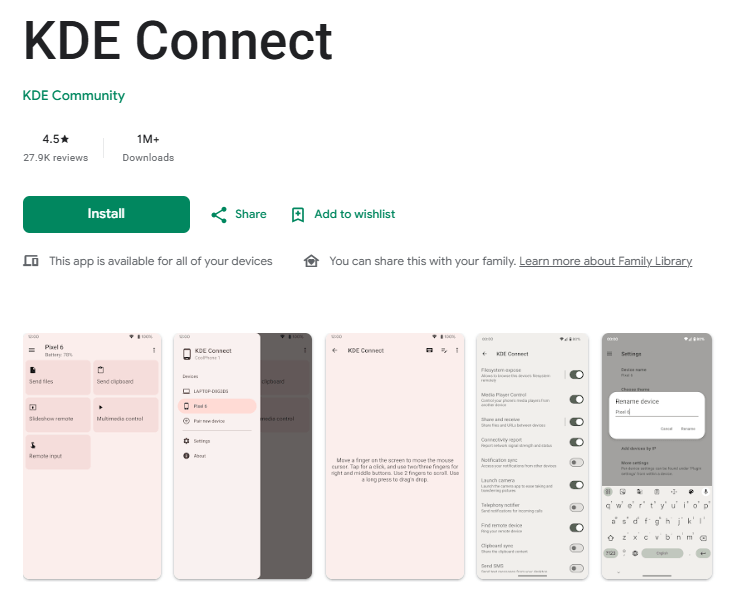
One of the main uses of KDE Connect is device communication. After connecting compatible devices, the app allows them to exchange information and work together.
The app supports file and link sharing between connected devices. This can be useful when you need to move something from your phone to your computer or send a link between devices without relying on another sharing method.
KDE Connect also provides remote-control features. A connected phone can be used for certain computer-related controls. This can be handy when you are away from the keyboard or mouse but still need to interact with the PC.
Another useful feature is notification integration. KDE Connect can allow notifications to be shared between the connected devices. This can reduce the need to repeatedly check the phone while working on the computer.
The app also supports remote input. Depending on the desktop setup and permissions, the phone can be used for functions such as controlling the computer.
KDE Connect is not limited to one small task. It brings several phone-to-PC functions into one connection. This makes it more useful for people who regularly work across both devices.
The app is also part of an open-source project, which makes it different from many closed commercial device-connection tools.
Testing Experience
KDE Connect is built around the idea of keeping a phone and PC connected. Once the devices are paired, the usefulness of the app depends mainly on how well the connection works between them.
The basic concept is easy to understand. You connect the Android phone with the computer and then use the available features from the connected devices. The experience is more practical when both devices are regularly used together.
File and link sharing can reduce small steps in everyday work. Instead of finding another way to transfer a link or file, KDE Connect provides these functions through the device connection.
Notification sharing is also useful for people who spend a lot of time at the computer. It can reduce unnecessary phone checking, although the exact experience depends on the permissions and desktop configuration being used.
The remote-control functions add another layer of usefulness. They can be helpful when you want to control something on the PC without sitting directly in front of it.
However, KDE Connect is not a completely automatic setup. Users need to install and configure the software on the devices they want to connect. Permissions and desktop-side configuration can also affect which features are available.
The app is therefore better suited to users who are comfortable setting up a connection between devices. Once configured, the range of functions can make the connection worthwhile.
Privacy & Safety
KDE Connect is an open-source project from KDE. The Android application is designed to communicate with devices that you choose to connect.
Because the app handles communication between your phone and computer, permissions are important. Depending on the features you use, KDE Connect may need access to notifications, files, or other device functions.
Users should review the permissions requested by the Android application and enable only the features they need.
KDE Connect is not primarily an advertising-based service. Its purpose is to provide communication between your own devices.
For the most accurate information about current data handling and permissions, check the application’s Google Play listing and the KDE Connect documentation before installation.
Storage & Data Usage
KDE Connect needs to be installed on the Android device and on the computer you want to connect. Storage requirements are relatively small compared with apps that store large amounts of media.
The app uses network communication to connect devices and exchange information. How much data it uses depends on what you do with the connection.
For example, transferring files will use more data than simply exchanging small pieces of information. The exact usage therefore depends on how frequently and heavily you use the connection.
What I Liked
- Connects an Android phone with a PC.
- Supports file and link sharing.
- Provides notification integration.
- Includes remote-control features.
- Open-source project.
What Could Be Better
- Initial setup requires some configuration.
- Some features depend on permissions.
- The experience can vary depending on the computer and desktop setup.
- Users unfamiliar with device pairing may need time to understand the available options.
Frequently Asked Questions
What is KDE Connect?
KDE Connect is an application that connects Android devices with computers and allows them to communicate and share functions.
Can KDE Connect transfer files?
Yes. File sharing between connected devices is one of its main uses.
Can I receive phone notifications on my PC?
KDE Connect supports notification integration between connected devices. The feature depends on the permissions and setup you use.
Can my phone control my computer?
KDE Connect provides remote-control and input features that allow the phone to perform certain computer-related functions.
Is KDE Connect only for KDE computers?
No. KDE Connect is designed to work across supported desktop environments. The exact experience depends on the desktop application and configuration.
Aklak Studio Verdict
KDE Connect is a practical choice for anyone who wants a closer connection between an Android phone and a PC. Its biggest advantage is that it combines several useful functions instead of focusing on only file transfers.
It is particularly useful if you regularly work on a computer but still need information from your phone. File sharing, link sharing, notifications, and remote-control functions can reduce the need to switch between devices.
The main drawback is setup. Users need to install the required software and configure the connection correctly. Some features also require additional permissions.
If you want a simple Android-to-PC connection with several useful tools, KDE Connect is worth trying.
Final Scorecard
Ease of Use: ★★★★☆ (4.2/5)
Performance: ★★★★☆ (4.3/5)
Features: ★★★★★ (4.6/5)
Privacy & Safety: ★★★★☆ (4.4/5)
Value for Money: ★★★★★ (4.7/5)
Overall Rating: ★★★★☆ (4.4/5)