Have you ever been in the middle of an important video call with family overseas or colleagues working remotely, only to have the screen pixelate into an unreadable blur the moment your cellular signal drops slightly? For smartphone users relying on standard messaging platforms, maintaining consistent, high-definition video clarity over unstable networks is a frustrating daily battle that disrupts communication. JioChat beautifully resolves this connectivity headache by deploying a highly optimized, regional communication framework engineered to squeeze crisp, high-fidelity audio and video out of low-bandwidth mobile connections, transforming unstable video streaming into a clear, reliable, single-app science.
App Overview & Market Position
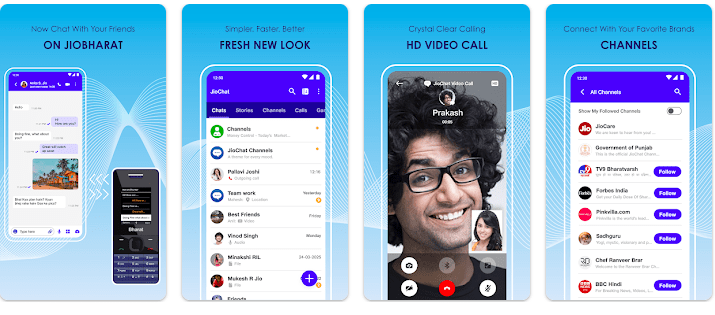
JioChat is a feature-rich instant messaging and Voice over Internet Protocol (VoIP) utility built to streamline communication across digital networks. Developed by Jio Platforms Limited (a major digital services subsidiary of Reliance Industries based in India), the application operates as an all-in-one connectivity deck. It allows users to send rich text messages, exchange high-definition voice and video signals, and host massive group conferences without requiring heavy hardware or separate software clients.
In the highly competitive social networking and communication market, JioChat holds a unique position by catering directly to regional connectivity demands and multi-device cross-compatibility. While global communication platforms scale their video resolutions back during peak regional network loads, JioChat focuses heavily on high-speed optimization. Its clear unique selling point is its Native High-Definition Cross-Device Integration. It bridges communication barriers by allowing users on standard Android and iOS smartphones to initiate smooth, stutter-free high-definition video calls directly with users on low-cost JioPhone feature devices—delivering an elite, highly accessible layer of communication across entirely different hardware tiers completely free of charge.
Key Features at a Glance
- High-Definition Multi-Party Video Calls: Host crisp, high-fidelity video conferences and voice chats with up to 500 active participants seamlessly on a optimized interface.
- Cross-Hardware Telecom Compatibility: Call loved ones or business contacts moving between high-end smartphones and low-cost feature devices without experiencing format or call-drop drops.
- Bite-Sized Interactive Video Stories: Share your daily highlights, custom video status updates, and interactive media clips cleanly with your contact list using built-in security features.
- Localized Multi-Language Navigation Interface: Navigate the app using major regional Indian languages like Hindi, Malayalam, Tamil, Telugu, and Gujarati to support non-English speakers.
User Data & Market Reach
| Platform | Star Rating | Total Reviews | Downloads |
| iOS App Store | 3.4 / 5 | ~1,100 | Multi-Million Ecosystem Presence |
| Google Play Store | 4.3 / 5 | ~715,000 | 50 Million+ Active Installs |
Technical Performance Review
- Storage: Remarkably streamlined and lightweight on physical drive memory, requiring an initial download package of under 40MB on Android platforms, making it highly suitable for budget smartphones.
- Data Usage: Highly optimized for lower data consumption; the application uses specialized compression algorithms to deliver high-definition video signals over low-bandwidth cellular environments.
- Battery/Efficiency: Fairly stable during text-based messaging loops, though hosting prolonged multi-party video calls with your screen set to high brightness will cause standard, expected battery usage.
Aklakstudio Advice: If you frequently use JioChat for long video meetings or family calls over cellular networks, activate the app’s internal “Data Saver” mode to significantly reduce data consumption without noticeably reducing your video resolution.
Head-to-Head Comparison
| Attribute | JioChat App | Mainstream Messaging Platforms (e.g., WhatsApp) |
| Cross-Device Bridges | High (Connects smartphone users directly to low-cost JioPhone feature phone hardware with optimized video rendering) | None (Restricts high-end video calls and advanced chats strictly to users running modern smartphone operating systems) |
| Group Calling Capacities | Extensive (Supports massive interactive video conference rooms matching enterprise standards for large scale crowds) | Limited (Focuses primarily on small, personal family chats with restrictive participant cap limits for video feeds) |
| Localized Personalization | Specialized (Features multi-lingual layouts across major regional languages along with custom brand channels for local updates) | Generalized (Applies broad global interface rule sets that lack tailored regional content or localized lifestyle feeds) |
Best Practices & Safety
- Audit System Media Approvals: To safeguard your personal data privacy, regularly check your smartphone’s privacy dashboard to ensure JioChat only accesses your camera and microphone when the app is actively open on your screen.
- Backup Your History Manually: Keep your important personal and business conversations safe by utilizing the app’s native “Chat Export” feature to save your text records securely before switching to a new phone.
- Filter Branded Notification Streams: Prevent your main chat view from becoming cluttered with promotional updates by jumping into the “Channels” tab settings to mute notifications from brands you no longer follow closely.
Setup Guide
1.Install the Verified Software Client:Takes 1 min.
Open the Google Play Store or iOS App Store on your smartphone, search for “JioChat” published by Jio Platforms Limited, and download the app safely.
2.Authorize Core Communication Privileges:Takes 30 seconds.
Launch the app and grant it explicit permission to access your device’s Camera, Microphone, and Contacts when prompted by the operating system.
3.Complete Your Mobile Profile Verification:Takes 1 min.
Enter your mobile phone number to receive a secure, automated one-time password (OTP) verification code via SMS to securely activate your profile link.
4.Personalize Language Filters and Call:Instant.
Select your preferred regional language layout from the initialization menu, tap the new call icon, and instantly select an active contact to start an HD video call.
Common Questions (FAQ)
Q: Do I need an active Reliance Jio SIM card inside my smartphone to use the JioChat app?
A: Not at all. While the application is beautifully optimized to run on Jio’s network infrastructure, you can download, register, and use all of JioChat’s text and video calling features using any active mobile carrier network or home Wi-Fi link.
Q: Can I share heavy presentation slides, spreadsheets, or uncompressed media files within chats?
A: Yes. JioChat features an integrated file transfer module that lets you send document types like PDFs, ZIP archives, and high-resolution videos directly to your contacts without applying harsh compression limits.
Q: Does JioChat offer encryption safeguards to protect my daily calls and personal chats?
A: Yes. The application uses standardized security encryption protocols to keep your data transfers safe while moving across internet networks, preventing unauthorized third parties from intercepting your text chats or live video calls.
Download the Official Version
- Android Users: Download on the Google Play Store
- iOS Users: Download on the Apple App Store
The Aklakstudio Final Verdict
The JioChat mobile application is an outstanding, highly dependable communication tool that does a phenomenal job of turning high-definition video calling into an accessible, zero-cost daily science. By offering robust group calling capacities alongside great optimization for low-bandwidth networks and excellent multi-device compatibility with feature phones, it respects both your data limitations and your social needs perfectly. It is an indispensable daily helper for families wanting to stay in touch across different generations of devices, community groups hosting massive virtual get-togethers, and regional users who want a communication space configured in their native language. However, enterprise team leads who require advanced corporate software integrations, multi-tenant digital whiteboards, or automated call scheduling systems will find its layout a bit too casual and will eventually want to look toward heavy enterprise productivity suites instead.
Rating Scorecard
- Ease of Use: 4.7 / 5
- Speed & Performance: 4.5 / 5
- Feature Set: 4.4 / 5
- Privacy & Safety: 4.1 / 5
- Value for Money: 5.0 / 5