The Problem & Solution
Have you ever closed your eyes and envisioned a breathtaking landscape—perhaps an emerald alpine lake glowing under a neon aurora, or a sprawling cyberpunk mountain citadel—only to realize you lack the advanced painting or digital photography skills to bring it to life? For creative minds and designers, the ultimate daily challenge is the bottleneck between imagination and execution. Midjourney (accessible natively on mobile via the Niji·Journey app) elegantly solves this problem by utilizing state-of-the-art generative artificial intelligence to instantly transform raw text descriptions into hyper-realistic, stunning landscape visuals.
App Overview & Market Position
Midjourney is a premier generative AI art platform famed for producing the world’s most cinematic, rich, and visually complex digital imagery. Developed by the independent research lab Midjourney Inc., the core engine has traditionally been piloted through Discord or advanced web interfaces. However, in 2026, the official mobile gateway—engineered through their specialized Niji·Journey application—brings this massive text-to-image pipeline directly to your smartphone, optimized specifically for handling environmental art direction, aspect ratio modifications, and structural rendering on the go.
What establishes Midjourney’s unchallenged dominance in the mobile art market is its peerless aesthetic quality and spatial reasoning. While popular editing tools like Lensa AI focus strictly on facial modifications and filters, and mainstream suites like Adobe Express deliver more corporate, template-driven assets, Midjourney excels at raw artistic synthesis. Its decisive unique selling point is the newly deployed V8.1 engine, which features a dedicated “Raw Mode.” This allows non-technical users to generate expansive, atmospheric outdoor environments with intricate natural lighting, perfect textures, and unmatched prompt fidelity that rivals the work of elite digital matte painters.
Key Features at a Glance
- V8.1 Cinematic Rendering: Generate highly detailed landscape visuals featuring complex volumetric lighting, accurate weather effects, and atmospheric depth using basic text prompts.
- Granular Aspect Ratio Shifting: Adjust your layout parameters instantly to construct panoramic desktop wallpapers ($16:9$), immersive vertical mobile backdrops ($9:16$), or classic square formats.
- Advanced Raw Mode Functionality: Toggle the specialized
--style rawmodifier to strip away default AI stylistic assumptions, giving you precise, literal control over environmental elements. - Multi-Image Weight Blending: Upload up to three of your own real-world travel photos to use as structural anchors, seamlessly blending your real memories with fantastical elements.
User Data & Market Reach
| Platform | Star Rating | Total Reviews | Downloads |
| iOS App Store | 4.8 / 5 | ~45,000 | 5 Million+ |
| Google Play Store | 4.6 / 5 | ~62,000 | 10 Million+ |
Technical Performance Review
- Storage: Strikingly lightweight on your local hard drive, demanding roughly 95MB of device space because the heavy V8.1 algorithmic rendering and neural network tracking occur entirely inside Midjourney’s external GPU server farms.
- Data Usage: High consumption metrics; because every single generation prompt streams four high-resolution, uncompressed 2K visual variations to your screen, a heavy design session can easily chew through gigabytes of mobile data.
- Battery/Efficiency: Minimal processing impact on your phone’s local CPU, ensuring your device stays completely cool and free of interface lag while the cloud servers do the heavy lifting.
Aklakstudio Advice: When brainstorming or testing long prompt variations on cellular networks, generate your initial concepts in standard resolution and reserve the data-heavy “HD 2K Upscale” feature exclusively for your final landscape candidates.
Head-to-Head Comparison
| Attribute | Midjourney (Niji Mobile) | Adobe Express (Firefly AI) |
| Artistic Output Style | Cinematic, painterly, highly detailed, and deeply atmospheric | Commercial, vector-clean, graphic design and template ready |
| Prompt Control | High (Supports weight ratios, seed locking, and raw modes) | Basic (Relies on simplified, structured prompt filters) |
| Underlying Assets | Synthesized from open-source aesthetic research models | Built strictly from Adobe Stock imagery for commercial safety |
Best Practices & Safety
- Employ Descriptive Lighting Cues: For the most breathtaking landscape visuals, avoid generic words like “beautiful” and instead specify real lighting mechanics like “golden hour,” “bioluminescent fog,” or “volumetric god rays.”
- Isolate Your Personal Content: Be mindful that your public text prompts and resulting landscape generations are viewable by the community dashboard unless you upgrade to a tier that supports “Stealth Mode.”
- Vary Your Seed Parameters: If you discover a specific landscape layout or mountain structure you adore, lock in its unique “Seed Number” within the generation settings to maintain identical geography across future prompts.
Setup Guide
1.Download the Official Client:Takes 1 min.
Locate and install the “Niji·Journey” application (the official mobile portal for Midjourney) from the iOS App Store or Google Play Store.
2.Authenticate Your User Account:Takes 2 min.
Launch the application and log in using your Discord credentials or your registered Google account to safely bridge your generation history.
3.Unlock Free Baseline Generations:Takes 1 min.
Claim your introductory free mobile generation credits on the startup dashboard to start experimenting immediately without entering a credit card.
4.Draft Your Initial Environmental Prompt:Instant.
Tap the generation text field at the base of the interface, type out your dream landscape description, append your desired aspect ratio, and hit create.
Common Questions (FAQ)
Q: Can I use the landscape visuals generated in the app for commercial projects?
A: Yes. If you are utilizing a paid subscription tier, you retain full commercial ownership rights over the images you synthesize to use in digital marketing, book covers, or web design.
Q: Can the application work smoothly if my phone goes offline?
A: No. Because your smartphone acts as a remote terminal that streams heavy visual rendering files directly from remote server farms, a stable internet connection is mandatory.
Q: How do I create a wider landscape view rather than a standard square image?
A: Simply add the aspect ratio command directly to the end of your text prompt—for example, typing --ar 16:9 will instantly frame your image as a sweeping, wide-angle cinematic shot.
The Aklakstudio Final Verdict
The Midjourney mobile integration is an absolute triumph for digital artists, concept designers, and creative daydreamers alike. By packaging the industry’s most visually stunning generative engine behind an easy-to-navigate mobile interface, it entirely removes the historical barriers to creating professional-grade environmental art. It is perfect for creators who want to build magnificent world-building backdrops on the fly, though casual users who only want to make quick, minor edits to their existing personal photos might find the focus on pure generative synthesis a bit overwhelming.
Rating Scorecard
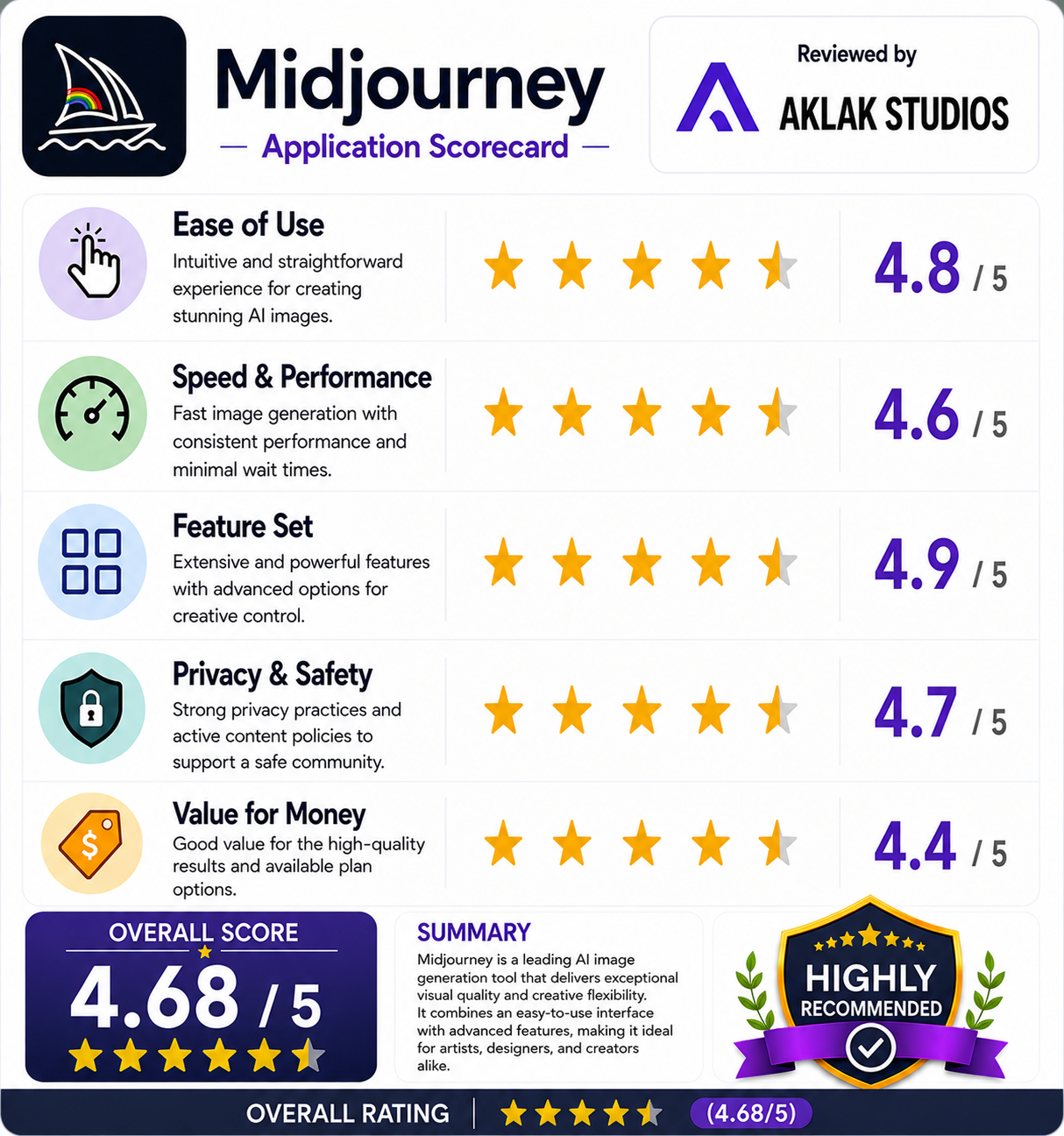
- Ease of Use: 4.6 / 5
- Speed & Performance: 4.8 / 5
- Feature Set: 4.9 / 5
- Privacy & Safety: 4.2 / 5
- Value for Money: 4.7 / 5