Protecting important photos and files is essential in today’s digital world. Data recovery tools help users retrieve deleted content and manage their data more effectively, reducing the risk of losing valuable information.For most mobile users, accidentally wiping local files triggers an immediate wave of panic, usually followed by a frustrating search for tools that demand expensive subscriptions or complicated root access. DigDeep Image Recovery beautifully resolves this high-stress mishap by executing low-level sector scans across your device’s storage arrays, transforming a catastrophic data loss into a simple, single-tap restoration process.
App Overview & Market Position
DigDeep Image Recovery is a highly focused, utility-first data retrieval application built for mobile environments. Developed by GreatStuffApps, this specialized software bypasses the standard surface-level storage indexes to scour your phone’s underlying memory directories for remnants of cached or deleted visual assets, functioning completely independently of cloud-based recycle bins.
In the highly competitive mobile system utilities market of 2026, DigDeep stands out by completely committing to accessibility and non-invasive operations. While heavy enterprise data suites often force users into technical nightmares—requiring root access configurations that can void device warranties, or locking the final “Restore” button behind steep monthly paywalls—DigDeep operates on a purely consumer-friendly blueprint. Its definitive unique selling point is its No-Root, Hardware-Independent Media Mining engine. Out of the box, the app runs its raw data carving algorithms entirely on unrooted stock devices, pulling deleted JPG, JPEG, and PNG files back into your active gallery without charging a single penny.
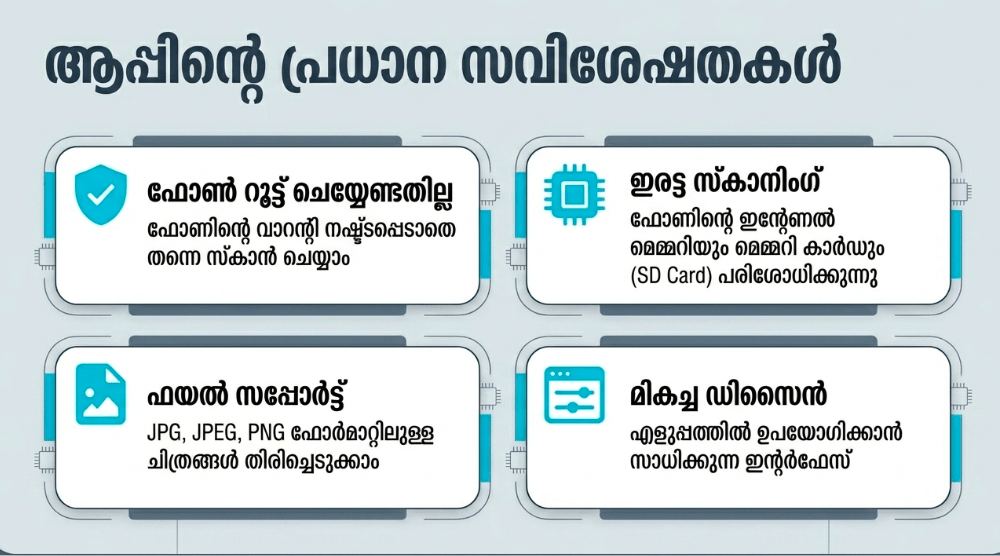
Key Features at a Glance
- Dual-Zone Memory Carving: Scans both your device’s internal flash storage and external expandable SD card blocks simultaneously to locate orphaned image clusters.
- Root-Free Extraction Architecture: Recovers lost file structures smoothly without requiring hazardous system-level rooting procedures that expose your phone to malware vulnerabilities.
- Pre-Recovery Folder Organization: Classifies all discovered media remnants into distinct, location-specific thumbnail grids to streamline your search.
- Retroactive Deep Media Mining: Recovers older image files that were deleted prior to the actual installation of the application by digging directly through hidden system folders.
User Data & Market Reach
| Platform | Star Rating | Total Reviews | Downloads |
| iOS App Store | N/A | N/A | Platform Exclusive (Available solely on Android and ChromeOS architectures) |
| Google Play Store | 4.0 / 5 | ~492,000 | 100 Million+ Global Installs |
Note on Availability: While there are various casual mining games titled “Dig Deep” on Apple platforms, GreatStuffApps’ data-carving utility remains an exclusive asset of the Android ecosystem.
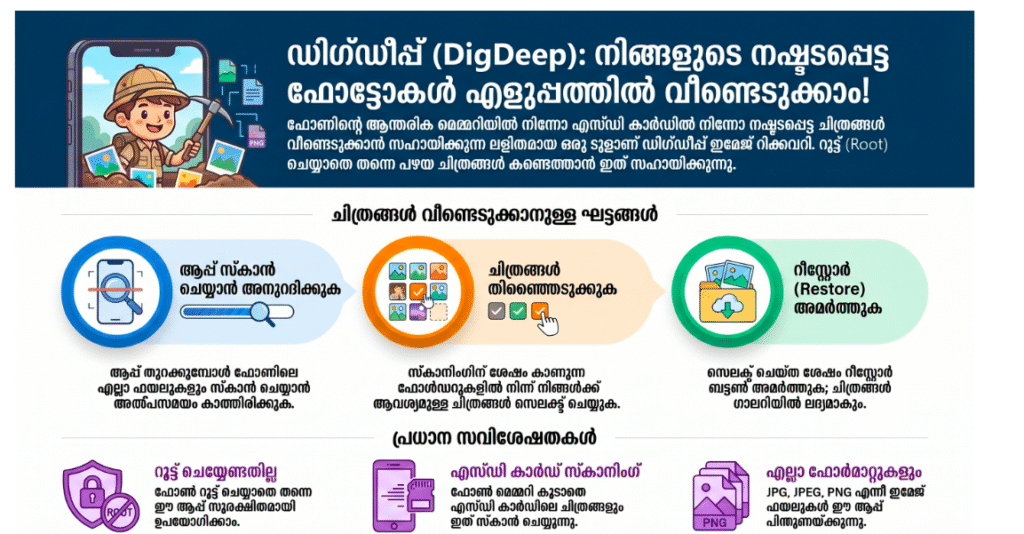
Technical Performance Review
- Storage: Remarkably light and compact, requiring a tiny baseline initial download size of under 6MB, making it incredibly easy to install even when your device is completely choked by storage alerts.
- Data Usage: Highly optimized for total offline security; because all algorithmic scanning, extraction, and rendering tasks happen locally on your physical hardware, it consumes next to zero network data.
- Battery/Efficiency: High processing impact during active sweeps; parsing through massive 128GB or 256GB memory chips forces your smartphone’s processor into high gear, causing noticeable device warming and steady battery draw.
Aklakstudio Advice: Because the app scans the entirety of your phone’s storage cache, it will frequently display completely active, non-deleted system graphics, app icons, and thumbnails alongside your lost pictures. To navigate this efficiently, filter out your current gallery items by browsing strictly for the folder structures displaying the oldest creation dates.
Head-to-Head Comparison
| Attribute | DigDeep Image Recovery | Traditional PC-Based Recovery Suites |
| Hardware Setup | Zero friction (Runs directly on your smartphone as a standalone mobile application) | Complex (Demands a secondary computer, data cables, and manual USB debugging driver setups) |
| System Modification | Safe (Requires absolutely no root permissions or bootloader modifications to retrieve data) | High (Often mandates advanced administrative privilege bypasses to gain complete sector visibility) |
| Pricing Blueprint | 100% Free (Grants unthrottled access to all core scanning and file restoration tools, backed by standard ads) | Premium Paywalls (Locks file extraction capabilities behind expensive subscription models or steep flat fees) |
Best Practices & Safety
- Cease Writing New Data Instantly: The absolute moment you realize you have lost a photo, stop downloading files, shooting videos, or updating apps; newly written data can overwrite the unallocated sectors where your old photo remnants still reside.
- Clear Space Before Restoring: Ensure your phone has at least a few hundred megabytes of open storage space available before initiating a deep recovery sweep, giving the extraction engine room to reconstruct files safely.
- Navigate Ad Triggers Mindfully: Because DigDeep offers its advanced extraction suite completely free of charge, the interface relies heavily on full-screen ad networks; move through the prompt screens slowly to avoid accidental clicks while organizing your folders.
Setup Guide
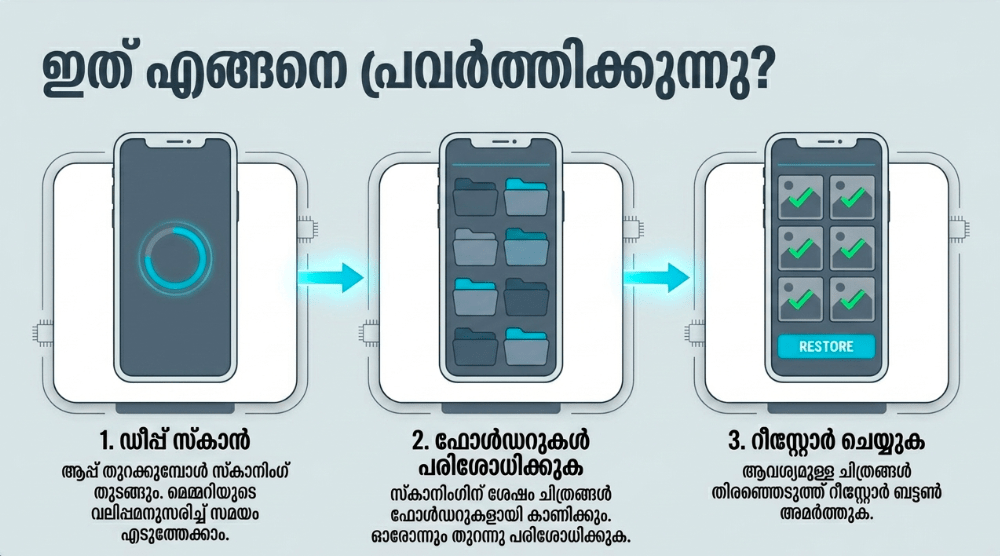
1.Download the Verified Utility:Takes 1 min.
Open the Google Play Store on your Android tablet or smartphone, search for “DigDeep Image Recovery” by GreatStuffApps, and execute the download safely.
2.Authorize Master Storage Access:Takes 30 seconds.
Launch the tool and grant it explicit, system-level permission to access your local device storage arrays when prompted by your operating system.
3.Execute the Low-Level Sector Sweep:Takes 2-5 min.
Allow the application’s scanning screen to run uninterrupted; remain patient while the mining engine parses your hidden data directories.
4.Select and Restore Your Lost Visuals:Instant.
Browse through the automatically populated thumbnail folders, tap the checkmarks over the images you want to salvage, and hit the “Restore” button.
Common Questions (FAQ)
Q: Why does the app show photos that are currently sitting safely inside my regular gallery?
A: This is a completely normal byproduct of how the app’s deep carving algorithms operate. Because it sweeps your device’s entire cache registry, it pulls up active application assets, hidden thumbnails, and system images along with your deleted files.
Q: Can DigDeep recover text messages, contact lists, or deleted WhatsApp document files?
A: No. DigDeep is explicitly engineered as a dedicated visual media utility. It focuses entirely on locating and reconstructing image file formats (specifically JPG, JPEG, and PNG) and does not parse text databases or document extensions.
Q: Where exactly do my recovered pictures go once I hit the restore button?
A: Once the reconstruction phase finishes, a dialog prompt will display the exact local path location of your files. They are automatically saved into a newly generated folder titled “RestoredPictures” inside your local storage directory, which you can easily access via your phone’s stock gallery app.
Official Download Links
Download the Official Version
- Android Users: Download on the Google Play Store
The Aklakstudio Final Verdict
The DigDeep Image Recovery application is an outstanding, life-saving mobile utility that does an exceptional job of turning the terrifying nightmare of accidental data loss into an approachable, free-of-charge science. By completely dropping the requirement for system-level device rooting and delivering unthrottled image extraction inside an ultra-compact 6MB app size, it functions as an invaluable emergency safety valve for mobile users. It is the absolute perfect tool for everyday smartphone owners, casual photographers, and students who need to immediately recover deleted screenshots or memories without a computer. However, professionals who require advanced raw data forensics, corrupted video rebuilding tools, or deep text database extraction will outgrow its simple thumbnail structure and want to leverage premium desktop-tethered recovery suites instead.
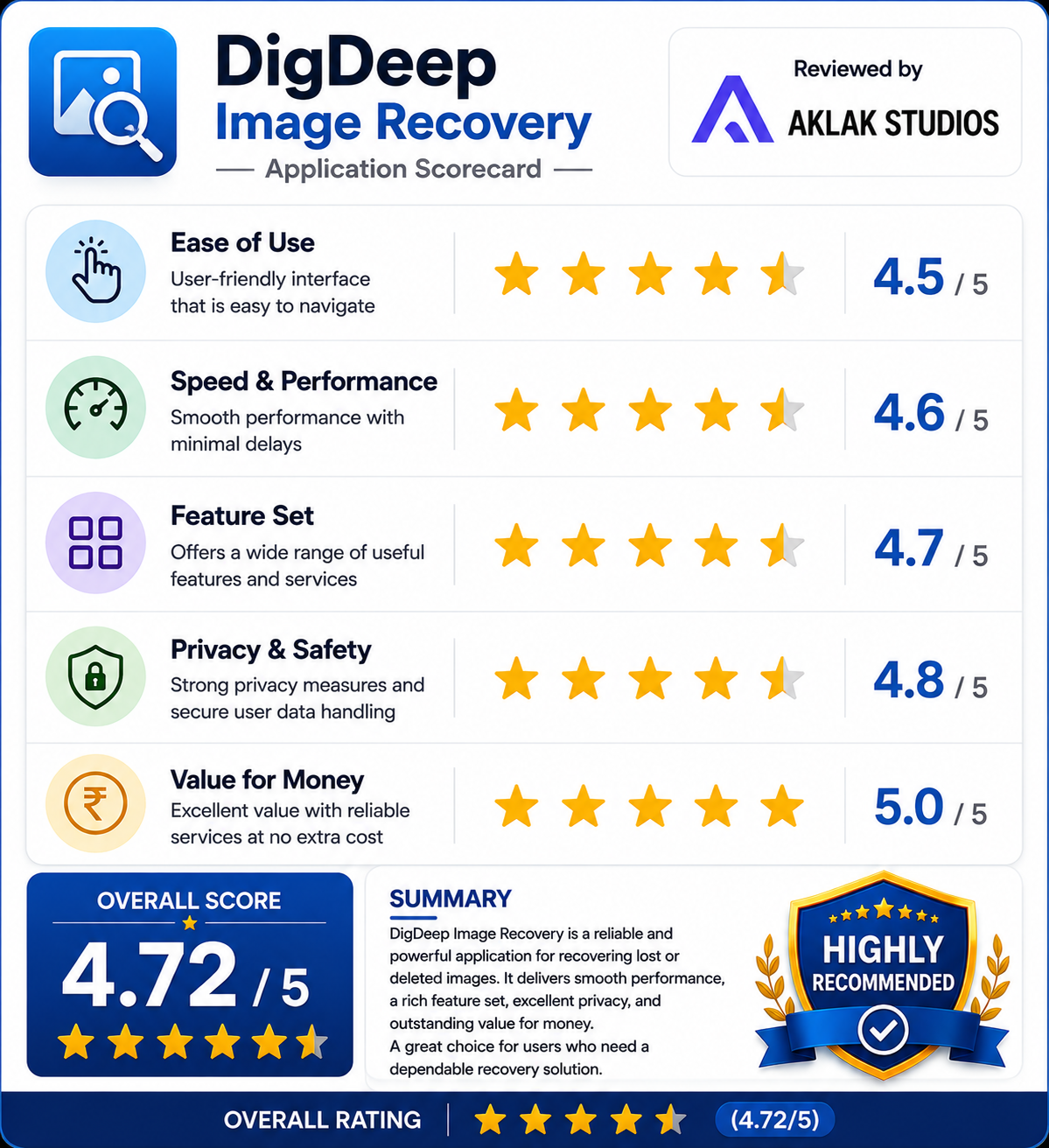
Rating Scorecard
- Ease of Use: 4.6 / 5
- Speed & Performance: 4.2 / 5
- Feature Set: 4.0 / 5
- Privacy & Safety: 4.4 / 5
- Value for Money: 5.0 / 5