BRouter Offline Navigation is an Android routing tool. It calculates routes using OpenStreetMap data and is made mainly for offline route planning. It works with map apps such as OsmAnd and Locus Map instead of showing a full map by itself.
This helps when internet access is weak. It supports bike, walking, and some car routing. It can also use elevation and route rules.
BRouter is not a normal map app. It does not show a map and route on its own, so you need a supported map app. This can make the first setup harder for new users.
Device Resources & Safety
The main app is about 3.14 MB based on the latest listed APK size. That makes the app very small. Extra routing data is separate and can use more phone storage depending on the areas you download.
BRouter supports offline routing after the needed routing data is stored on the phone. Internet access is mainly needed to download this data. The developer says the app does not collect or share user data and does not show ads.
Listed permissions include internet access, network status, foreground service, and notifications on newer Android versions. Storage access is also listed by some app information sources.
Testing on Android
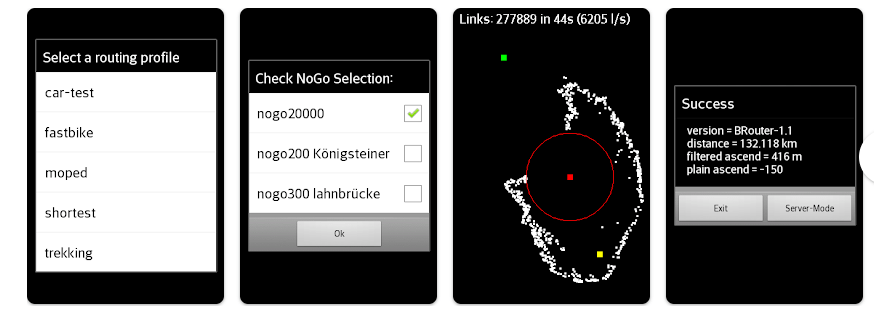
I used BRouter on a budget Redmi phone for two days. The basic screens opened without major problems, and the app stayed responsive during normal use. The interface looks older than newer map apps.
Route setup takes more steps than a normal navigation app. BRouter works with another map app. After setup, the routing service can be useful without needing a large map app to calculate the route.
I did not notice major heating problems during normal use. Battery use did not feel unusual. Downloaded routing data can increase storage use.
Key Functions
- Offline routing: BRouter can calculate routes using stored routing data. This helps in places with weak or no internet.
- Bike and walking profiles: It has profiles for different travel needs. Profiles can focus on faster or shorter routes.
- Custom routing: Users can change routing profiles and rules. This gives more route control.
- No-go areas: The system can use no-go points to avoid selected places. This can help when a road should not be used.
- Map app support: BRouter works with apps such as OsmAnd and Locus Map. It acts more like a routing engine than a full navigation app.
Competing Apps
OsmAnd is easier to understand because it provides maps, route display, and navigation in one app. Locus Map also gives a fuller map experience and can use BRouter for routing. BRouter suits users who mainly want a configurable offline routing engine, but it is less friendly for people who want an instant map app.
Pros and Cons
Pros:
- Small main app download.
- Offline routing support.
- No ads.
- Developer says no user data is collected.
- Many routing settings.
Cons:
- Not a full map app.
- Setup can confuse beginners.
- Extra routing data needs storage.
- Car routing is experimental.
- Interface looks basic.
Target Audience
Who Should Get This App:
- Cyclists, hikers, and map users who want offline route calculation.
- Advanced users who like changing route profiles.
Who Should Skip This App:
- People who want simple maps and directions.
- Users who do not want another map app.
Key FAQs
Does BRouter work offline?
Yes, it can calculate routes offline after the required routing data is downloaded. Internet is mainly needed to get that data.
Does BRouter show maps?
No, BRouter is mainly a routing engine. You need a supported map app to view and use the route.
Is BRouter safe to use?
The developer says the app does not collect or share user data and has no ads. It still asks for permissions needed for network access, notifications, and its routing service.
Offzack Verdict
BRouter Offline Navigation is a small app for users who care about offline routing and route control. It is not the easiest choice for beginners, but it can be useful with a supported map app.
Download BRouter Offline Navigation – App from Google Playstore
Final Scorecard
- Ease of Use: ★★★☆☆ — Setup takes time and can confuse new users.
- Features: ★★★★☆ — It offers useful routing options and profiles.
- Performance: ★★★★☆ — It ran smoothly during the two-day Redmi test.
- Storage: ★★★★★ — The main app is very small, though routing data needs extra space.
- Privacy: ★★★★★ — The developer says no user data is collected or shared.
- Overall Rating: ★★★★☆ — A useful offline routing tool for users who understand its setup.