
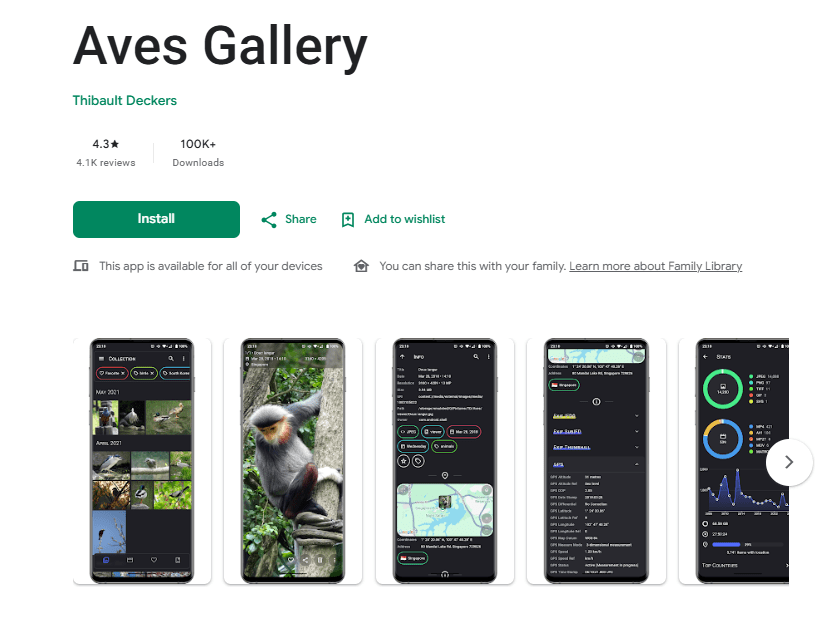
Aves Gallery is an Android gallery app designed for viewing, organizing, searching, and exploring photos and videos stored on your device. It is more than a basic photo viewer because it also works as a metadata explorer. The app can read information connected to your media and lets you move between albums, photos, tags, locations, and maps.
The app supports common formats such as JPEG and MP4, along with less common formats including multi-page TIFF, SVG, and some older video formats. It can also identify different types of media, including motion photos, panoramas, 360-degree videos, and GeoTIFF files.
Aves is aimed at Android users who want more control over a large photo collection. It can also work as a media viewer and picker. The app integrates with Android features such as global search, app shortcuts, widgets, and screen saver support.
Key Features
One of Aves Gallery’s main strengths is its wide media support. It is not limited to the usual photo and video formats. The app can handle JPEG and MP4 files as well as formats such as TIFF, SVG, and older AVI files. This makes it useful for people with different types of media stored on their phones.
The app also puts considerable focus on search and navigation. Instead of simply opening folders, users can move between albums, photos, tags, and maps. Media can also be explored through metadata, making the gallery more useful when you have a large collection.
Aves can identify special types of images and videos. These include motion photos, photo spheres, 360-degree videos, and GeoTIFF files. This gives the gallery a wider range of uses than a basic app that only displays standard pictures.
Another useful area is location information. Aves can read locations stored in media and use them to display coordinates and group media by country. Network access is used for the map view and, when needed, more precise reverse geocoding.
The app also works with Android TV and provides features such as app shortcuts and global search handling. It can function as a media picker, which makes it useful beyond simply browsing your personal gallery.
Testing Experience
Aves Gallery is designed around navigation and searching through a media collection. The interface gives users several ways to move through their content, rather than relying only on traditional folders. This is useful when you have many photos and want to find particular items without manually opening every album.
The app’s recent development also shows continued work on its features. The June 2026 Google Play update included improvements such as slow-motion video support, keeping media selections through multiple edits, an Explorer navigation bar, GPX track export, statistics export, regular-expression search, and additional language support.
Performance can depend on the size of the media collection. A recent Google Play review reported that the app became slower with a collection of more than 100,000 images. The developer acknowledged that Aves can start becoming sluggish with collections above that size.
For most users, the larger concern is therefore not the number of basic gallery functions but how the app handles a very large collection. If your phone contains an unusually high number of images, browsing and indexing may not feel as quick as it does with a smaller library.
The app also gives users control over how media is displayed. A recent user review praised its customization options and the ability to change the home view to focus on particular file types. Another user highlighted its simplicity, customization, and lack of advertisements. These are user experiences rather than guaranteed performance results for every device.
Privacy & Safety
Aves requires access to shared media storage so it can display your photos and videos. If you want to modify media, the app requires explicit access from the user. It can also read location information stored in your media for features involving coordinates and countries.
The app needs network access for features such as maps and precise reverse geocoding. It can also check network connection status so that features requiring internet access can respond appropriately when a connection is unavailable.
According to the Google Play Data Safety section, no data is shared with third parties. Google Play also states that the app may collect app activity and app information and performance data, and that data is encrypted in transit.
Storage & Data Usage
Aves is primarily a gallery app for media already stored on your device. Its main storage use therefore relates to the app itself and the media collection it displays.
Internet access is needed for certain features, particularly maps and precise reverse geocoding. The core purpose of browsing your local photos and videos does not depend on continuously streaming those files from the internet.
Users should also remember that a large media collection can affect the overall gallery experience. The developer has acknowledged possible sluggishness with collections containing more than 100,000 images.
What I Liked
- Supports many photo and video formats.
- Strong search and navigation options.
- Useful metadata and location-based exploration.
- Supports special media such as motion photos and 360-degree videos.
- No third-party data sharing is declared on Google Play.
What Could Be Better
- Very large photo collections can become slower.
- Some location features require network access.
- The wide range of options may be more than casual gallery users need.
- Media in hidden system folders is not displayed because Aves works with publicly available media content rather than functioning as a file manager.
Frequently Asked Questions
Is Aves Gallery just a basic photo viewer?
No. It is a gallery and metadata explorer. It combines photo and video viewing with search, tags, maps, and metadata-based navigation.
Can Aves Gallery handle different file formats?
Yes. It supports common formats such as JPEG and MP4, along with formats including multi-page TIFF, SVG, and some older video formats.
Can Aves show photos on a map?
Yes. Aves can read location information from media and use it for map-related features and country grouping. Network access may be needed for map and reverse-geocoding functions.
Does Aves Gallery show hidden folders?
No. Aves is a gallery rather than a file manager. Media in hidden system folders is not considered publicly available media content for the app.
Can I hide media in Aves?
Yes. Aves provides filters that can hide selected media from its own views. This does not make those files inaccessible to other apps that already have access to the device storage.
Aklak Studio Verdict
Aves Gallery is worth considering if you want more from an Android gallery than simply opening photos. Its support for different media formats, metadata, tags, maps, and advanced navigation makes it particularly useful for people with larger or more varied collections.
It may feel like more than necessary if you only need a simple gallery for viewing recent pictures. The number of options can be better suited to users who want to organize and explore their media in more detail.
Performance should also be considered if you have an extremely large collection. The developer acknowledges that the app can become sluggish with more than 100,000 images.
Overall, Aves Gallery is a practical choice for users who value detailed media organization, search, and metadata features.
Final Scorecard
Ease of Use: ★★★★☆ (4.3/5)
Performance: ★★★★☆ (4.1/5)
Features: ★★★★★ (4.7/5)
Privacy & Safety: ★★★★☆ (4.5/5)
Value for Money: ★★★★☆ (4.5/5)
Overall Rating: ★★★★☆ (4.4/5)