Want to make your smartphone photos look more professional? Advanced photo editing apps and mobile photography tools can help improve image quality, enhance colors, and create social media-ready photos in just a few taps. Capturing the perfect balance of light and shadow on a mobile device is notoriously difficult, leaving many of our favorite memories looking flat or washed out. Fortunately, the Adobe Lightroom Mobile App is designed to solve exactly this problem, putting professional-grade darkroom tools right inside your pocket.
App Overview & Market Position
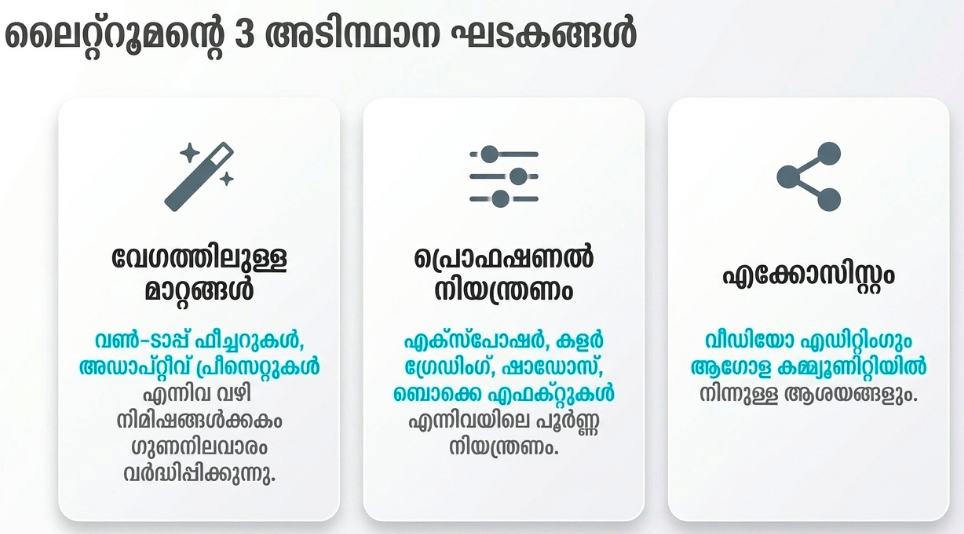
Developed by creative software giant Adobe Inc., Lightroom Mobile is a powerhouse photo and video editing application tailored for mobile ecosystems. Unlike basic filter apps that simply layer generic colors over your images, Lightroom operates as a non-destructive editor. This means it allows you to manipulate deep image data—like pulling details out of overexposed skies or brightening harsh shadows—without ruining the original file quality.
In a crowded market filled with quick-fix editing apps like VSCO, Snapseed, and Picsart, Lightroom stands out through its unique selling point: desktop-class color science and seamless cloud integration. It positions itself as the industry standard for creators who demand precise tone control, advanced RAW photo processing, and the ability to start an edit on a phone and finish it on a laptop without losing a single adjustment.

Key Features at a Glance
- Generative Remove: This AI-powered tool allows you to seamlessly erase unwanted background distractions or random people from your photos with a single tap.
- Pro-Level Color Grading: You can independently adjust the hue, saturation, and luminance of individual colors to create a unique, stylized aesthetic.
- RAW Image Processing: The app captures and edits uncompressed RAW photo formats, giving you maximum control over highlights, shadows, and exposure recovery.
- Adaptive Presets: This feature uses artificial intelligence to automatically detect specific elements of your photo, like the sky or a subject’s skin, and applies tailored enhancements instantly.
- Cloud Syncing & Organization: All of your mobile edits and custom presets automatically sync across your tablets and desktop devices via Creative Cloud.
User Data & Market Reach
| Platform | Star Rating | Total Reviews | Downloads |
| iOS App Store | 4.8 / 5 | Over 335,000 | 50M+ Estimated |
| Google Play Store | 4.5 / 5 | Over 3.5 Million | 100M+ Verified |
Technical Performance Review
- Storage: The app installation package itself is moderately heavy (around 200MB–300MB), but its actual local storage footprint can balloon rapidly if you cache local RAW images or high-resolution smart previews.
- Data Usage: While basic offline editing uses no data, sync functions—such as importing large image libraries to the Adobe Creative Cloud—can consume immense amounts of cellular data if not restricted to Wi-Fi.
- Battery/Efficiency: Because it handles processor-intensive AI tasks and high-fidelity rendering, the app can noticeably warm up older devices and accelerate battery drain during extended, heavy editing sessions.
Aklakstudio Advice: Go into the app settings under Cloud & Storage and turn off “Use Cellular Data.” This prevents Lightroom from eating up your monthly mobile data limit by forcing cloud uploads to wait until you are securely connected to a home Wi-Fi network.
Head-to-Head Comparison
To understand how Lightroom holds its ground in the broader mobile utility market, let’s look at how its processing ecosystem compares directly against a popular, mainstream communication application like WhatsApp.
| Attribute | Adobe Lightroom Mobile | WhatsApp Messenger |
| Primary Utility | Advanced visual asset creation and non-destructive image tuning. | Real-time text messaging, voice calling, and basic media sharing. |
| Media Compression | Zero compression; preserves maximum file data and exports uncompressed assets. | High compression; heavily reduces photo and video quality to save chat bandwidth. |
| Hardware Demands | High CPU/GPU utilization; requires strong hardware processing for AI effects. | Low hardware demands; optimized to run smoothly on budget and legacy devices. |
Best Practices & Safety
- Secure Your Adobe ID: Enable two-factor authentication (2FA) on your Adobe account to ensure that the private personal photos synced to your cloud storage remain fully secure.
- Utilize Versions for Experimentation: Use the built-in “Versions” feature to save different editing styles on the same image, allowing you to jump back and forth without losing your progress.
- Manage Cloud Space Responsibly: Regularly clear out your deleted items folder within the app to free up your cloud allocation, as un-synchronized or bloated storage can cause local performance lag.
Setup Guide
1.Download and Install:Takes 1-2 minutes.
Open your device’s official app marketplace, search for “Adobe Lightroom,” and tap install to download the official package.
2.Create or Log In to Your Account:Required for cloud storage.
Launch the app and log in using an existing Adobe ID, Google, Apple, or Facebook profile to initialize your cloud workspace.
3.Grant Storage and Camera Permissions:Crucial first-run prompt.
Allow the app permission to access your device’s photo gallery and camera roll so it can import images for editing.
4.Set Up Import Preferences:Optimization step.
Navigate to the app settings menu to choose whether you want the app to automatically import newly taken smartphone photos, or if you prefer to select them manually.
Common Questions (FAQ)
Can I use Lightroom Mobile completely for free?
Yes. The core lighting, color, and cropping tools are entirely free to use. However, premium features like Generative Remove, geometry correction, and cloud syncing require a paid subscription.
Will deleting a photo from Lightroom delete it from my phone’s gallery?
No. Lightroom imports a copy of your photograph into its own internal ecosystem. Deleting an item inside the Lightroom app will not remove the original file from your native device gallery.
Does the mobile version support presets made for desktop?
Yes. If you log in with the same Adobe account, all of your custom desktop profiles and .xmp presets will automatically synchronize directly to your mobile app interface.
Official Download Links
Download the Official Version
- Android Devices: Get it on Google Play
- iOS Devices: Download on the Apple App Store
The Aklakstudio Final Verdict
Adobe Lightroom Mobile is an exceptional piece of software that brings professional-grade darkroom editing to everyday smartphones. It is absolutely perfect for social media content creators, travel bloggers, and serious hobbyist photographers who want to extract the maximum dynamic range out of their mobile photographs. However, because its interface leans into professional terminology—such as color wheels, histograms, and tone curves—it may feel unnecessarily complex or intimidating for casual users who just want to slap a quick, simple filter onto a family snapshot.
Rating Scorecard
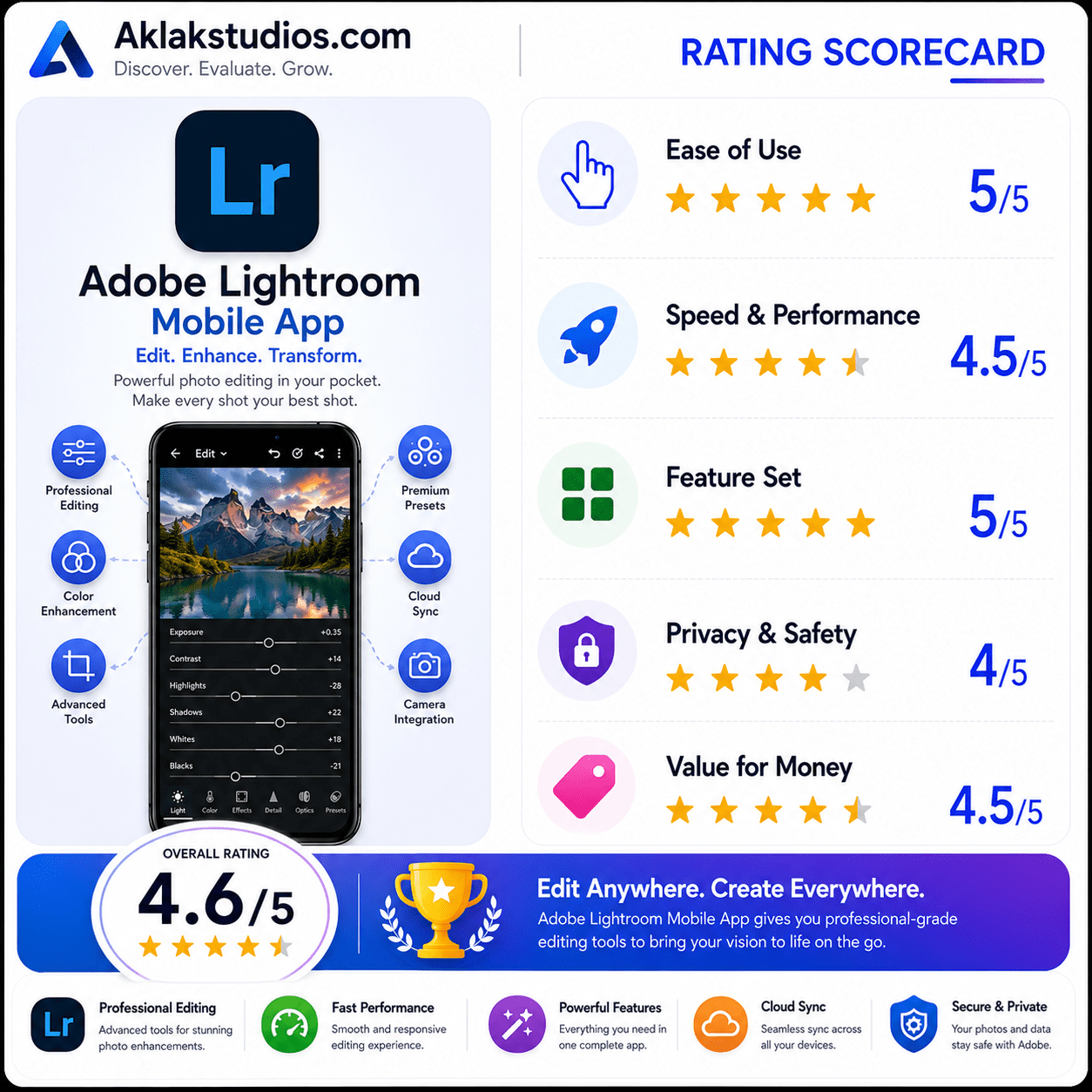
- Ease of Use: 4.0 / 5
- Speed & Performance: 4.3 / 5
- Feature Set: 4.9 / 5
- Privacy & Safety: 4.5 / 5
- Value for Money: 4.2 / 5
Overall Aklakstudio Score: 4.4 / 5