The Problem & Solution
Have you ever hung up a crucial phone call with a client, a utility company, or a contractor, only to realize you completely forgot to write down a critical address, a tracking code, or a price quote? For busy individuals and working professionals, relying strictly on mental memory during fast-paced phone conversations is a massive liability that easily leads to costly mistakes. Automatic Call Recorder ACR elegantly resolves this everyday organizational bottleneck by deploying a background listening pipeline that automatically records, organizes, and crystalizes your phone conversations the second a call connects.
App Overview & Market Position
Automatic Call Recorder ACR is an advanced, utility-first audio archiving application built specifically for mobile devices. Developed by Q4U Mobile Apps (and mirroring core utilities established across similar elite legacy systems by NLL and Appliqato), the software serves as a dedicated, automated flight recorder for your cellular activity. Available globally, the application unburdens users by immediately capturing two-way phone conversations, organizing them into a tidy local database, and providing tools to tag, note, or slice the audio segments without requiring manual recording activation.
Navigating the market landscape of 2026, Automatic Call Recorder ACR maintains a strong position by leaning heavily into accessible, multi-functional tool layouts. While stock smartphone dialers from Google or Samsung continue to lock out automatic recording features or trigger intrusive, loud public verbal alerts (“This call is now being recorded“) due to generic regional software profiles, ACR works through integrated system hooks. Its definitive unique selling point is its Hybrid Utility Suite. Instead of operating strictly as a basic voice logger, the platform seamlessly bridges automated high-fidelity telephone archiving with a built-in real-time Caller ID network, cloud backup structures, and a localized fingerprint privacy lock framework.
Key Features at a Glance
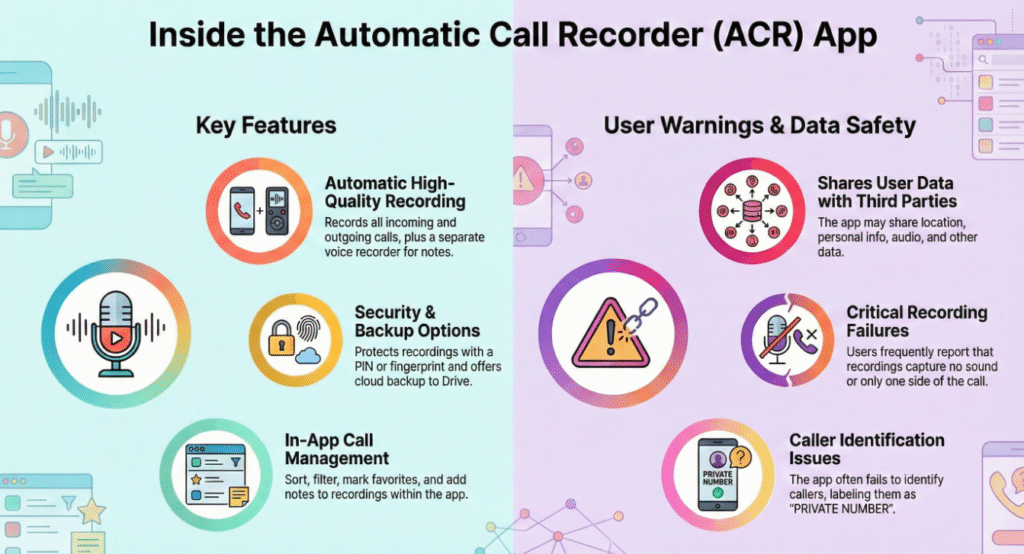
- Autonomous Two-Way Call Recording: Captures all incoming and outgoing cellular connections instantly in high-quality formats without requiring you to hit a start button.
- Real-Time Caller ID Lookup: Identifies unknown numbers, business profiles, and suspected spam networks on your screen before you even slide to answer the call.
- Biometric PIN & Fingerprint Protection: Encrypts and locks your private phone logs behind your phone’s fingerprint sensor or a private passcode entry.
- Integrated Text Note & Tag Manager: Pin custom written reminders, transaction values, or key contact logs directly onto specific timestamps within your finalized audio files.
User Data & Market Reach
| Platform | Star Rating | Total Reviews | Downloads |
| iOS App Store | 4.4 / 5 | ~14,500 | 10 Million+ Cumulative |
| Google Play Store | 3.5 / 5 | ~706,000 | 100 Million+ Global Installs |
Technical Performance Review
- Storage: Remarkably streamlined on initial installation at roughly 23MB, though your total storage footprint will scale upward dynamically based on the audio file formats (such as uncompressed WAV or compact AMR) you select.
- Data Usage: Highly optimized for low data consumption; the local audio recording functions consume zero network data, though syncing files to cloud storage like Google Drive or updating the spam caller database will use your data plan.
- Battery/Efficiency: Exceptionally passive when idling in standby, but running continuous, hours-long phone conversations while using cloud background processing can result in minor battery drain.
Aklakstudio Advice:If you are using a modern device running recent Android versions, navigate to your phone’s central Battery Settings, select the ACR app, and remove it from “Battery Optimization” to ensure your phone’s operating system doesn’t abruptly kill the recording process in the background.
Head-to-Head Comparison
| Attribute | Automatic Call Recorder ACR | Native Smartphone Dialers (Google/Samsung) |
| Automation Flow | High (Quietly records all incoming and outgoing conversations completely autonomously) | Low (Requires the user to manually tap record after the call connects every single time) |
| Privacy Protections | High (Features local app encryption, PIN locks, and quiet execution options) | None (Forces a loud, automated audio message to play out loud to both parties on line connection) |
| Cloud Synchronization | Broad (Features native, automated cloud mirroring to Google Drive and Dropbox accounts) | Restricted (Saves files strictly to your internal phone storage with no third-party cloud bridges) |
Best Practices & Safety
- Comply with Local Recording Laws: Always verify your local regional recording regulations (such as one-party vs. two-party consent laws) to confirm whether you must verbally notify the other line before utilizing the app’s files in formal disputes.
- Utilize the RTT Call Toggle If Audio Is Faint: If modern system updates cause the remote caller’s voice to sound quiet on your device, switch your device call preference to “RTT Call” inside your accessibility settings to boost internal channel volume.
- Regularly Cycle Old Audio Data: Set a structural “Smart Clean” parameter within the app’s preference options to automatically delete trivial casual calls after 30 days while locking up important files securely.
Setup Guide
1.Install the Verified Software Client:Takes 1 min.
Navigate directly to the Google Play Store or iOS App Store, search for “Automatic Call Recorder ACR” developed by Q4U Mobile Apps, and download the official package.
2.Authorize Core Accessibility Permissions:Takes 2 min.
Launch the app and follow the on-screen steps to grant access to your Microphone, Contacts, and Call Logs, then toggle the “ACR Accessibility Service” switch to On inside your phone’s System Settings.
3.Configure Cloud Backup Handshakes:Takes 1 min.
Navigate to the app’s storage configurations tray and log into your preferred cloud environment (Google Drive or Dropbox) to ensure real-time file mirroring.
4.Test and Calibrate Your Sound Channels:Instant.
Place a brief test call to a friend or an automated system line to verify that both your voice and the remote caller’s audio are tracking crisply on the final playback bar.
Common Questions (FAQ)
Q: Why does the application only record my own voice and leave the remote caller completely muted?
A: This is due to safety and security limits that Google and Apple regularly patch into newer smartphone operating systems. To fix this, you must enable the app’s helper service within your phone’s System Accessibility menu, or switch your device onto speakerphone mode during a call.
Q: Can I organize specific contacts so that their calls are never recorded?
A: Yes! The app features a robust “Smart ACR Filter” tool that lets you set up an ignore list for specific contacts, like close family members, while keeping automatic recording active for unknown numbers and business lines.
Q: Does the app place watermarks or length limitations on my recorded conversations?
A: No. ACR allows you to record unlimited conversations with zero artificial length restrictions, capped only by your local phone memory or cloud account storage space.
Download the Official Version
- Android Users: Download on the Google Play Store
The Aklakstudio Final Verdict
The Automatic Call Recorder ACR application is an incredibly useful, reliable utility that does an exceptional job of turning chaotic phone conversations into an organized, searchable digital database. By pairing autonomous recording with built-in Caller ID lookups and cloud-syncing options, it creates an excellent productivity safety net for freelance workers, contractors, and real estate professionals. However, because modern smartphone operating systems regularly introduce strict security blocks on call logging, non-technical users should be prepared to spend a few minutes adjusting their phone’s deep Accessibility settings to get crisp, two-sided recording working perfectly.
Rating Scorecard
- Ease of Use: 4.2 / 5
- Speed & Performance: 4.4 / 5
- Feature Set: 4.6 / 5
- Privacy & Safety: 4.0 / 5
- Value for Money: 4.5 / 5