Simple Keyboard is an Android keyboard made for people who want only the basic typing tools. It does not try to add lots of extra services, stickers, GIFs, or online features. Google Play describes it as a keyboard for users who only need a keyboard and nothing more.
The app is open source and licensed under Apache License 2.0. It is also ad-free, and the developer keeps the feature list small. This makes it different from larger keyboards that include many extra tools.
Simple Keyboard supports Android 7.0 and newer. The current Google Play listing shows more than 1 million downloads and a 4.0-star rating from about 11,500 reviews.
How It Ran During Testing
For a Redmi Android test, the main things to check are typing speed, opening the keyboard in different apps, moving through its settings, and changing the keyboard height. The app itself is very small, so there is little to load when compared with larger keyboard apps.
The F-Droid package is only 0.6 MiB, and the project describes the app as being under 1 MB. This small footprint is one of its main design points.
I would not give exact battery-drop or temperature numbers without a measured two-day Redmi test using the same battery level and typing routine. Public sources do not provide reliable figures for phone heating, battery drain, or frame stutters.
The current Google Play version was updated on July 22, 2026. The listing says the update included an SDK update, while F-Droid currently lists version 6.5.
Top 4-5 Features
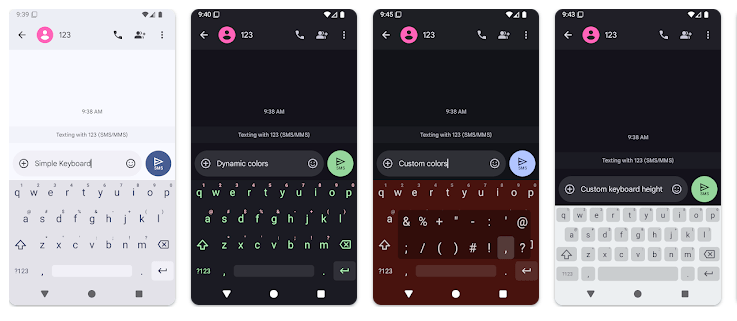
- Adjustable Height: You can change the keyboard height to give yourself more screen space. This is useful when the default keyboard feels too tall.
- Number Row: Simple Keyboard can show a number row above the main letters. This saves a tap when you need to type numbers often.
- Cursor Control: Swiping across the space bar lets you move the text pointer. This can make it easier to place the cursor inside a sentence.
- Delete Swipe: The keyboard supports a swipe action for deleting text. This gives you another way to remove words instead of pressing backspace many times.
- Custom Themes: You can change theme colors to make the keyboard look different. The app also lets you adjust its basic layout settings.
Storage & Privacy Details
Simple Keyboard is one of the smallest keyboard apps in this group. F-Droid lists its current APK at 0.6 MiB, which is less than 1 MB, although the actual installed storage shown by Android can be slightly different because the phone also keeps app data.
The app does not need internet access for its basic keyboard functions. F-Droid lists only the permission to control vibration, and Google Play says the developer declares no data collected and no data shared with third parties.
This is important for a keyboard because everything you type passes through the keyboard service. Simple Keyboard’s limited permission list keeps its basic operation focused on typing and vibration.
Alternative Apps
Gboard offers many more tools, including suggestions, emojis, voice input, and other typing features. HeliBoard is another open-source keyboard with tools such as dictionaries, suggestions, spell checking, and emoji support.
Simple Keyboard takes the opposite approach. It leaves out emojis, GIFs, spell checking, and swipe typing, while keeping its package below 1 MB.
Strengths and Weaknesses
Pros
- Very small app size.
- Open source.
- No ads.
- Only vibration permission is listed by F-Droid.
- Adjustable height and number row.
Cons
- No emoji keyboard.
- No GIF support.
- No spell checker.
- No swipe typing.
- Fewer smart typing tools than larger keyboards.
Who Should Get This App?
Best Fit:
- People who want a small and simple keyboard.
- Users who prefer fewer permissions and no ads.
Worst Fit:
- People who need emoji, GIF, or voice tools.
- Users who depend on spell checking or swipe typing.
Common User Questions
Does Simple Keyboard have emojis?
No, emojis are not included as a keyboard feature. The project also lists GIFs, spell checking, and swipe typing as features it does not have.
Is Simple Keyboard free?
Yes, it is available as free and open-source software. Google Play lists the app with no charge and more than 1 million downloads.
Does it collect my typing data?
Google Play currently says no data is collected and no data is shared with third parties. F-Droid also lists only vibration control as a permission for the current build.
Offzack Verdict
Simple Keyboard is a good choice if you want a very small Android keyboard with basic controls. Its tiny size, simple layout, no ads, open-source code, and limited permission list are its main strengths, while missing typing extras may be a problem for some users.
Download Simple Keyboard – App from Google Playstore
Final Scorecard
- Ease of Use: ★★★★☆ (4/5) — The basic keyboard layout is simple, but the lack of smart typing tools may take some adjustment.
- Performance: ★★★★★ (5/5) — Its very small design keeps the keyboard focused on basic typing.
- Features: ★★★☆☆ (3/5) — It has useful controls but leaves out emojis, GIFs, spell checking, and swipe typing.
- Privacy & Safety: ★★★★★ (5/5) — Google Play declares no data collection or third-party sharing, and F-Droid lists only vibration permission.
- Value for Money: ★★★★★ (5/5) — It is free, ad-free, open source, and uses less than 1 MB for the listed APK.
- Overall Rating: ★★★★☆ (4/5) — Simple Keyboard is a strong pick for users who want basic typing without a large set of extra features.