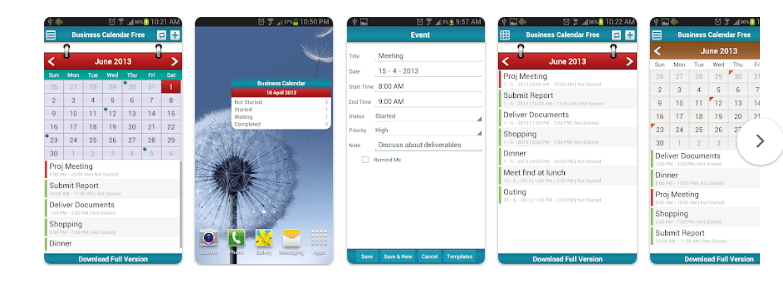
Keeping track of appointments, meetings, tasks, and important events can become difficult when everything is written in different places. A calendar app can make it easier to manage your daily schedule and remember important activities.
Business Calendar – Event & Todo is an Android calendar and planning app designed to help users organize appointments, events, and tasks from one place. It combines calendar functions with to-do features so users can manage their schedules and daily activities more easily.
The app can be useful for professionals, students, families, and anyone who wants a better way to organize their time.
What Is Business Calendar – Event & Todo?
Business Calendar – Event & Todo is a calendar and task-management application for Android. It allows users to manage events and appointments while also keeping track of tasks and to-do items.
Instead of using one application for your calendar and another for your tasks, the app brings both functions together.
You can use it to plan meetings, appointments, birthdays, reminders, and other activities that you do not want to forget.
Main Features of Business Calendar
The app offers several features designed to make calendar management easier.
1. Calendar Views
A useful calendar app should make it easy to see what is coming up. Business Calendar provides different calendar views that help users check their schedules.
You can use the calendar to get an overview of your upcoming events and appointments and switch between different ways of viewing your schedule.
This can make it easier to understand how your day, week, or month is planned.
2. Event Management
Business Calendar allows users to create and manage events.
You can add important information to an event, such as the event title, date, time, and other details. This can be useful for appointments, meetings, classes, birthdays, and personal activities.
Having all your events in one calendar can make it easier to keep track of your commitments.
3. Todo and Task Management
One of the main features that separates this app from a basic calendar is its Todo functionality.
You can create tasks and to-do items alongside your calendar events. This allows you to keep appointments and tasks together instead of managing them separately.
For example, you could add a meeting to your calendar and create a related task that needs to be completed before the meeting.
4. Reminders
Reminders can help you remember upcoming events and tasks.
Instead of depending entirely on your memory, you can use reminders to receive notifications about important activities.
This can be particularly helpful for appointments, deadlines, meetings, and other time-sensitive activities.
5. Recurring Events
Some activities happen regularly. Weekly meetings, monthly appointments, birthdays, and other repeated activities do not need to be entered manually every time.
Recurring event functionality can make it easier to manage these types of schedules.
6. Organize Your Schedule
Business Calendar can help you keep different parts of your schedule organized.
When your appointments, meetings, events, and tasks are kept in one place, it becomes easier to see what you need to do and when you need to do it.
This can be especially useful for people who have busy daily schedules.
Business Calendar for Work
As the name suggests, Business Calendar can be useful for professional schedules.
People can use a calendar to keep track of meetings, appointments, deadlines, and work-related activities.
For professionals who have several appointments during the week, having a clear calendar can help reduce the chances of missing an important event.
Business Calendar for Personal Use
The app is not limited to business activities.
You can also use it for personal planning. For example, you can organize birthdays, family events, appointments, shopping-related tasks, or other activities.
Combining personal and professional schedules in one calendar can give you a clearer view of your overall day.
Business Calendar for Students
Students can also use a calendar and task manager to organize their studies.
You can add classes, assignments, exams, project deadlines, and other important activities to your schedule.
The Todo feature can then be used to keep track of individual tasks that need to be completed.
This can be helpful when several deadlines are approaching at the same time.
Why Use a Calendar and Todo App?
A calendar shows when something needs to happen, while a to-do list helps you remember what needs to be done.
Using both together can make planning easier.
For example:
- Add a doctor’s appointment to the calendar.
- Create a task to prepare the required documents.
- Set a reminder for the appointment.
- Check the calendar to see other activities planned for that day.
This type of organization can help you manage your time more effectively.
User-Friendly Scheduling
A calendar application needs to make adding and checking events simple. Business Calendar focuses on bringing calendar and task functions together so users can manage their schedules from one application.
The usefulness of the app will depend on your personal planning habits and the features you need. Users who prefer having events and tasks in one place may find this approach convenient.
Business Calendar App Details
| Feature | Details |
|---|---|
| App Name | Business Calendar – Event & Todo |
| Platform | Android |
| App Type | Calendar / Productivity |
| Package Name | com.safusion.android.businesscalendar.trail |
| Main Purpose | Calendar, events and tasks |
| Availability | Google Play Store |
App features, pricing, supported services, and availability may change with future updates. Always check the latest Google Play listing before installing the application.
Pros of Business Calendar – Event & Todo
- Combines calendar and to-do features
- Useful for managing appointments and events
- Can help organize work and personal schedules
- Useful for students and professionals
- Supports task-based planning
- Helps keep important activities in one place
Cons of Business Calendar – Event & Todo
- Some users may prefer a simple calendar without additional features
- The number of available functions may take time to explore
- Certain features may depend on the version of the app
- Users should check the current Google Play listing for the latest pricing and feature information
Who Should Use Business Calendar?
Business Calendar – Event & Todo can be useful for people who want more than a basic calendar.
It may be a good option for:
- Professionals managing meetings and appointments
- Students organizing classes and deadlines
- Families keeping track of personal activities
- Freelancers managing appointments and work tasks
- Busy users who want events and tasks together
If you regularly use both a calendar and a to-do list, having them together may make your daily planning more convenient.
Final Verdict
Business Calendar – Event & Todo is an Android productivity app that combines calendar management with task and to-do functionality.
Its main purpose is to help users organize appointments, events, and tasks from one place. This can be useful for both professional and personal schedules.
If you are looking for an Android calendar app that goes beyond simply showing dates and includes tools for managing your daily tasks, Business Calendar – Event & Todo is worth exploring.
Download Business Calendar – Event & Todo
You can check the latest app information, features, screenshots, ratings, and installation options on Google Play:
Google Play:
https://play.google.com/store/apps/details?id=com.safusion.android.businesscalendar.trail