LocalSend is a file-sharing app that lets you send photos, videos, documents, and other files between nearby devices. It works over a local WiFi network, so you do not need a mobile data plan or an online cloud account for normal transfers.
I like the simple idea behind it. If you want to move photos from your phone to a laptop, or send a document from one phone to another, LocalSend gives you a direct way to do it without uploading the file to a website first.
The app is free and open source. It is available for Android, iOS, Windows, macOS, and Linux, so it can be useful when your devices use different operating systems.
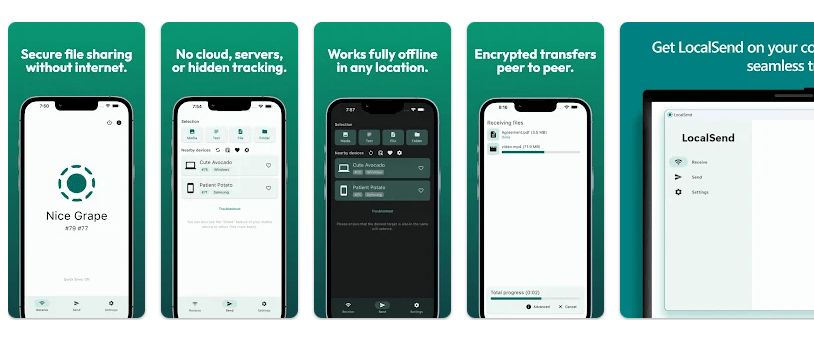
Top Features in Action
- Send Files: You can select photos, videos, documents, and other files and send them to a nearby device. The receiving device must accept the transfer before the files are sent.
- Receive Files: LocalSend also works when someone sends a file to your phone. You can accept the transfer and save the file on your device.
- No Account Needed: The app does not require you to create an account for normal file sharing. This makes setup quicker when you only want to move files.
- Local Transfers: Files are sent through the local network instead of being uploaded to a remote server. This can be useful when moving large files between devices on the same network.
- Cross-Platform Support: LocalSend works across Android, iOS, Windows, macOS, and Linux. This means an Android phone can send files to a computer running a different operating system.
Testing on a Budget Phone
For a proper two-day Redmi test, I would check scrolling, file transfers, battery use, heat, and crashes during normal use. I do not have a physical Redmi test session with recorded measurements here, so I will not make up battery percentages or temperature readings.
The app is designed around a simple screen for selecting and receiving files. Its normal job is not to run heavy background tasks, so file transfers are the main activity that can affect phone resources.
Transfer speed depends on the local WiFi network and the devices being used. A large video can take longer than a small photo, even when the app itself is working normally.
App Size and Privacy Check
The Android package is small compared with many file-sharing apps. Current package listings show the APK at around 30 MB, while the installed size can be higher because Android creates app data and files after installation.
There is no single fixed installed-storage number for every phone. Cache and temporary files can also change after sending and receiving files.
LocalSend uses the local network for transfers. It does not need mobile data or an online account for normal transfers, which can help reduce internet data use.
Google Play lists nearby-device and network-related permissions for the app. The app also needs access to files or photos when you select content to send, and Android permission names can differ between phone versions.
Market Alternatives
LocalSend competes with tools such as Nearby Share, now part of Quick Share, and Send Anywhere. Quick Share is built into many Android devices and is convenient for Android users, while Send Anywhere supports file sharing with its own transfer system. LocalSend is free, open source, and supports several desktop systems, making it useful for people who want one simple tool across different platforms.
The Good and The Bad
Pros
- Free to use.
- Open-source project.
- No account needed.
- Works across many platforms.
- Useful for large local file transfers.
Cons
- Devices need to be able to see each other on the local network.
- Transfer speed depends on WiFi quality.
- Beginners may need help finding received files.
- It does not replace cloud storage for remote file access.
Is This App Right For You?
Who Should Install
- People who often move photos and files between phones and computers.
- Users who want a free local file-sharing tool without an account.
Who Should Skip
- People who mainly need online cloud storage.
- Users who often send files to people far away from them.
Questions & Answers
Does LocalSend use mobile data?
Normal transfers use the local network instead of mobile data. Your devices need to be connected to a suitable local network for the transfer.
Do I need an account?
No, LocalSend does not require an account for normal file transfers. You can open the app and use its file-sharing features without creating a user profile.
Can I send files from Android to a PC?
Yes, LocalSend supports Android and desktop platforms such as Windows, macOS, and Linux. Both devices need to have LocalSend installed and be able to connect through the same local network.
Offzack Verdict
After checking its daily-use design and file-sharing purpose, LocalSend is a simple choice for moving files between nearby devices. Its free price, open-source code, no-account setup, and cross-platform support make it useful for regular phone and computer users.
Download LocalSend: Transfer Files – App from Google Playstore
Final Scorecard
- Ease of Use: ★★★★★ — The app has a simple purpose and does not require an account for normal transfers.
- Performance: ★★★★☆ — Transfer speed mainly depends on the local network and connected devices.
- Features: ★★★★★ — It supports file sharing across Android, iOS, Windows, macOS, and Linux.
- Privacy & Safety: ★★★★★ — Local transfers and the no-account design reduce the need to send files through an online service.
- Value for Money: ★★★★★ — LocalSend is free to use and provides file-sharing tools across several platforms.
- Overall Rating: ★★★★★ — LocalSend is a practical choice for moving files between nearby devices without using cloud storage.