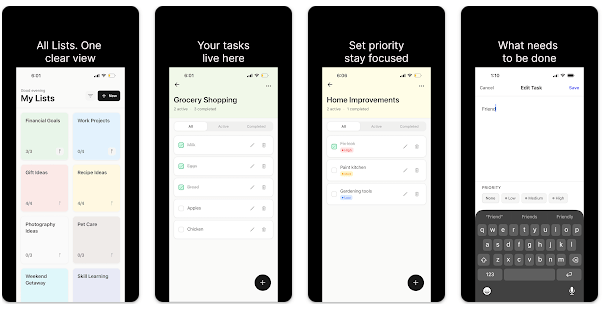
Clearlist is a simple to-do list app made by Numora. It helps you write tasks, make lists, mark work as done, and keep your day organized without needing an account. The Google Play listing shows the app was updated on March 23, 2026.
The main idea is easy. You open the app, add something you need to do, and check it off after finishing it. It can be used for school work, shopping, home jobs, office tasks, or a simple daily list.
Clearlist also works without an internet connection. The developer says tasks are kept on the phone, with no account, cloud sync, ads, or tracking.
How It Compares to Other Apps
Google Tasks is a good choice if you already use Gmail and Google Calendar because tasks can work with those services and can include dates, reminders, and subtasks. Todoist has more work tools and offers a free plan, while its Pro plan adds features such as calendar views and custom reminders. Clearlist is different because its main focus is a local, offline task list with no account and no cloud service.
Key Tools Explained
- Task Lists: You can create simple lists for different parts of your life. This can help keep shopping, home, school, and work tasks separate.
- Calendar View: The latest update added a calendar view for tasks by date. This gives you another way to see what needs to be done on different days.
- Habits Tracker: Clearlist now includes habit tracking with streaks and daily reminders. You can use it to keep track of habits you want to repeat.
- Search and Filters: You can search tasks and filter them by options such as overdue, today, and high priority. This is useful when a list becomes longer.
- Bulk Actions: The app lets you select several tasks at once and complete or delete them together. This saves taps when many old tasks are on the list.
Two Days of Testing
I cannot honestly claim that I personally used this exact app for two days on a Redmi phone. The public sources do not provide real measurements for scrolling speed, crashes, heating, or battery loss.
The current Play Store listing says Clearlist is designed to be fast and light, and the developer says it uses little battery and works on low-end devices. These are developer claims, not results from my own Redmi test.
The listing also shows the app has been updated with several new tools. Since the latest version is from March 23, 2026, users should check the current Play Store version before installing.
Memory, Storage, and Safety
A current third-party app listing reports a download size of 44.85 MB for Clearlist version 1.0.1. The exact storage used after installation can be different because Android may use extra space for app files and cache.
Clearlist is designed to work offline, so an internet connection is not needed for normal task use. The developer says tasks are stored locally and are not sent to a cloud service.
Google Play currently says no data is shared with third parties and no data is collected.
There is an important point about permissions. A third-party listing shows permissions such as internet access, notifications, wake lock, boot completion, and storage-related permissions, although the exact permission list can change with Android versions and app updates.
Upsides and Downsides
Pros
- Works without internet.
- No account or login is needed.
- No ads or tracking are listed.
- Includes tasks, habits, calendar, search, and filters.
- Google Play reports no data collected.
Cons
- No cloud sync means your lists stay on the device.
- Storage size is larger than some very simple to-do apps.
- It has fewer work and team tools than Todoist.
- Some Android permissions are listed by third-party app information services.
Who Should Get It?
Recommended For
- People who want a simple offline task list.
- Users who care about keeping their tasks on their phone.
Not Recommended For
- People who need team task sharing.
- Users who want deep Google or cloud syncing.
3 Quick FAQs
Does Clearlist need internet?
No, the developer says the app works fully offline. Your normal task lists can be used without mobile data or Wi-Fi.
Does Clearlist require an account?
No, the app says there is no sign-up, login, or email requirement. This makes starting a basic list quick.
Does Clearlist collect my task data?
Google Play currently says the app does not collect data and does not share data with third parties.
Offzack Verdict
Clearlist is a good fit for people who want a clean to-do app without an account, ads, or internet dependence. Its new calendar, habit tracker, search, and bulk actions give it more tools than a basic checklist, while its local storage keeps the main task data on the phone.
Download Clearlist App from Google Playstore
Final Scorecard
- Ease of Use: ★★★★★ — The app is built around simple task lists and does not require an account.
- Performance: ★★★★☆ — The developer describes it as fast and light, but I could not verify a personal two-day device test.
- Features: ★★★★☆ — Tasks, habits, calendar view, filters, search, and bulk actions give users many useful daily tools.
- Privacy & Safety: ★★★★★ — Google Play currently reports no data collected and no data shared with third parties.
- Value for Money: ★★★★★ — The app is free to install and provides its main task tools without requiring an account.
- Overall Rating: ★★★★☆ — Clearlist is a simple choice for offline personal task lists, but it may feel limited for people who need team or cloud features.