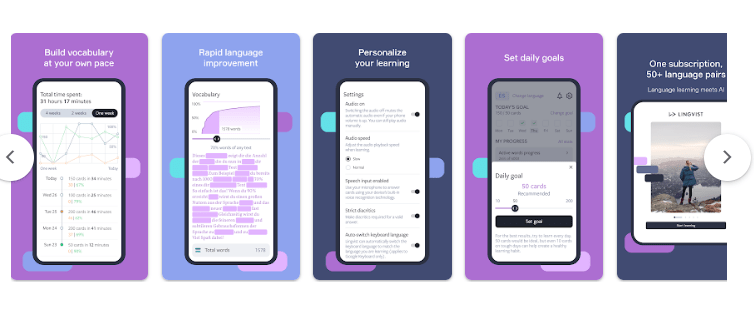
Lingvist is a language-learning app with a strong focus on vocabulary. Instead of giving every learner the same list of words, it uses adaptive practice to decide what you should review and what you are ready to learn next.
The app uses your answers and learning history to adjust vocabulary practice. Its spaced-repetition system brings words back for review at times chosen by the system. The aim is to help you spend more time on words that need practice rather than repeatedly studying words you already know well.
Lingvist is designed for both beginners and more advanced learners. The current Google Play listing includes full courses in languages such as Spanish, French, Japanese, German, Portuguese, Italian, Dutch, Russian, Korean, Swedish, Danish, Norwegian, Polish and Estonian.
It is a good fit for learners who want to build vocabulary through regular practice. It is less focused on replacing real conversations with other people. Even Lingvist describes its role as building a vocabulary foundation rather than replacing speaking practice with real people.
Key Features
The main feature is adaptive vocabulary practice. Lingvist uses your performance to decide which words should come back for review. Words that are difficult for you can appear more often, while words you already know can receive less attention.
The app uses spaced repetition. Instead of asking you to remember every word at the same time, it schedules reviews based on your previous answers and learning history. This is useful if you often forget when you should revise older vocabulary.
Lingvist also uses words in context. Its courses present vocabulary through sentences rather than treating every word as a completely separate item. The app includes concise grammar information alongside vocabulary practice.
Another useful option is specialist vocabulary. Along with its main vocabulary decks, Lingvist offers handcrafted decks covering specific subjects. This can be useful when you want vocabulary connected to a particular interest or area of study.
The app also supports custom decks. According to the Google Play description, users can upload a textbook or Wikipedia article and have Lingvist create a custom deck from the content. This gives learners a way to study vocabulary connected to material they actually want to understand.
Learners can also mute individual words they do not want to see during practice. This gives some control over the vocabulary being reviewed.
Testing Experience
The available source information does not provide a complete independent phone test covering battery consumption, heating, loading times, crashes, or long-term stability. Those areas should therefore not be presented as confirmed test results.
The available user feedback gives a more useful picture of the learning experience. One Google Play reviewer who used Lingvist for French liked the way the app presented a word in different sentences and allowed other words in a sentence to be explored through context. The same reviewer found the Korean experience less effective and described it as more repetitive.
This suggests that the experience can vary depending on the language course. That is worth keeping in mind if you are choosing Lingvist for a specific language.
The adaptive system is one of the app’s strongest ideas. It does not simply move through a fixed list at the same speed for everyone. Your answers influence what comes next and when older vocabulary returns.
There is also a practical downside to this approach. Review words can build up. Lingvist explains that new material may not appear until the queued review material has been completed. This means regular practice matters if you want to keep the learning flow manageable.
Another Google Play reviewer criticized the subscription model and said the app was difficult to keep using without subscribing. This is a user opinion rather than a general performance finding, but it is relevant when considering the overall experience.

Privacy & Safety
The supplied Google Play information does not provide enough detail here to make a complete independent privacy assessment. The important point for users is that Lingvist requires a subscription for access to its full learning materials and courses. The Play Store listing also states that subscriptions automatically renew unless auto-renewal is turned off at least 24 hours before the end of the payment period.
The app uses AI and learning algorithms to personalize vocabulary practice. Its system uses information from your interactions with the app to adjust the words presented for review.
Because the available material does not give enough evidence about specific permissions or detailed data-safety practices, those points are not rated here.
Storage & Data Usage
The supplied sources do not state the exact storage requirement or cache size for the Android app.
Lingvist is primarily an online language-learning service with courses, vocabulary decks and custom content. The available information does not provide enough evidence to confirm which parts of the learning experience can be used fully offline.
For that reason, specific storage or mobile-data figures should not be assumed.
What I Liked
- Adaptive practice adjusts vocabulary review to your learning history.
- Spaced repetition helps bring difficult words back for review.
- Vocabulary is presented in sentence context.
- Custom decks can be created from supplied content.
- Specialist decks are available for focused vocabulary practice.
What Could Be Better
- The experience can vary between language courses.
- Review words can build up if you do not keep practicing.
- Some users may find the subscription requirement restrictive.
- The app is mainly vocabulary-focused rather than a replacement for real conversations.
Frequently Asked Questions
What is Lingvist mainly used for?
Lingvist is mainly designed for vocabulary learning. It uses adaptive practice and spaced repetition to decide which words you should review and learn next.
Does Lingvist use spaced repetition?
Yes. Its system schedules vocabulary reviews based on your previous learning and interaction with the app.
Can I create custom vocabulary decks?
Yes. The Google Play listing says you can upload material such as a textbook or Wikipedia article and use it to generate a custom vocabulary deck.
Is Lingvist suitable for beginners?
Yes. The current Google Play description says Lingvist is designed for complete beginners as well as advanced learners.
Is the full Lingvist course free?
No. The current Google Play listing says a subscription is required to access the full learning materials for all available languages.
Aklak Studio Verdict
Lingvist is a useful option if your main goal is to build vocabulary through regular, personalized practice. Its adaptive system is the main reason to consider it. Instead of giving every learner exactly the same review schedule, it uses your learning history to decide which words need more attention.
It is particularly suitable for people who like structured vocabulary practice and want to study words in context. The custom-deck feature is also useful when you want to focus on specific material or subjects.
However, it should not be treated as a complete replacement for speaking with real people. Lingvist itself positions vocabulary building as a foundation for communication.
The subscription requirement may also be a drawback for users looking for a mostly free learning app.
Final Scorecard
Because the available source material does not provide a complete hands-on test of battery use, heating, crashes, or every aspect of performance, unsupported numerical ratings would be misleading.
- Ease of Use: Not rated — insufficient independent testing evidence
- Performance: Not rated — insufficient phone-testing evidence
- Features: Not rated — no reliable review-based scoring system supplied
- Privacy & Safety: Not rated — insufficient detailed evidence
- Value for Money: Not rated — subscription value depends on individual use
Overall Rating: Not rated — additional hands-on testing would be needed for a fair numerical score.