
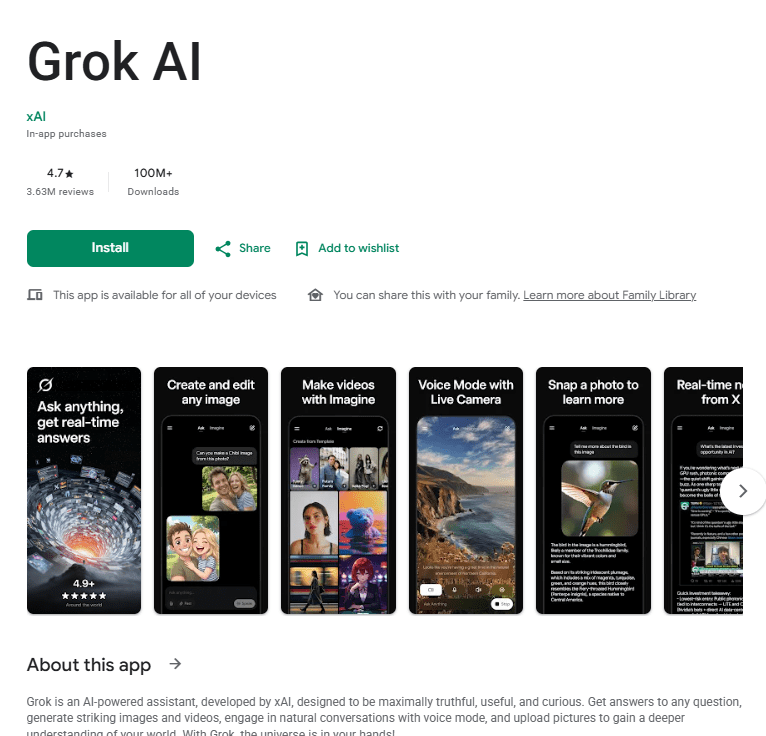
Grok AI is xAI’s assistant app for Android, built by Elon Musk’s AI company. It’s designed to answer questions, generate images and videos, and hold natural conversations through voice mode.
One thing that sets Grok apart is its connection to real-time data from X (formerly Twitter). This makes it a useful pick for anyone who wants an AI assistant that can pull in current information rather than relying only on static training data.
The app is rated for users 18 and up and includes in-app purchases for its Super Grok subscription tier. It’s aimed at people who want a fast, curious, and conversational AI tool, whether that’s for quick answers, image generation, or just chatting. With over 100 million downloads and a 4.8-star rating from more than 3.5 million reviews, it’s become one of the more popular AI apps on Android, ranking #4 in top-grossing productivity apps.
Key Features
Grok’s core feature is its question-answering chatbot, built to be direct and conversational rather than overly cautious. You can ask it almost anything and get a fast response.
Image and video generation is another major draw. Users can create original images and short videos from text prompts, which has made the app popular for creative and entertainment use.
Voice mode lets you talk to Grok naturally instead of typing, which is handy for hands-free use or longer back-and-forth conversations.
You can also upload photos directly into the chat to get a deeper understanding of what you’re looking at, similar to how other major AI apps handle image uploads.
The app’s tie to real-time X data is arguably its most distinct feature. Instead of only working from a fixed knowledge base, Grok can factor in current information, which matters for anyone asking about recent events or trending topics.
Testing Experience
Grok feels fast and responsive for basic chatting, and the voice mode makes longer conversations feel more natural than typing everything out. New users should find the core chat experience easy to pick up.
That said, several users report a noticeable gap between what’s advertised for Grok’s paid Super Grok tier and what’s actually available on Android. Features like companions, expanded content modes, and longer video generation are mentioned as missing or limited on the Android app compared to what’s promoted.
Content moderation has also tightened over time, according to user feedback. Some users who relied on the image generation tools for creative projects say prompts that used to work now get blocked more often, which has been a source of frustration.
A few smaller usability issues show up too. Some users report that voice dictation doesn’t work well on certain Android phones, and that the Enter key sends a message immediately instead of allowing a new paragraph, which can be annoying when typing longer messages. Non-subscribers may also hit request limits during periods of high server traffic.
Privacy & Safety
Grok requires an account to use, and the app is rated for users 18 and older, reflecting its more open content approach compared to some other AI apps.
According to the app’s Data Safety section, Grok may share data such as photos and videos, and app activity, with third parties. It also collects location, personal information, and several other data types during regular use. All data is encrypted in transit, and users can request that their data be deleted.
The app includes in-app purchases through its Super Grok subscription, which unlocks additional features. The free tier remains usable, though some functionality is limited to paying subscribers.
Storage & Data Usage
Grok installs like a typical AI chatbot app and doesn’t require excessive storage space. Because responses, image generation, and video creation are all processed through xAI’s servers, a stable internet connection is required to use the app.
The listing doesn’t provide specific details on offline support or cache growth, so this is primarily an online tool. Heavier features like video generation likely use more data than basic text chatting.
Pros & Cons
What I Liked
- Fast, direct responses for everyday questions
- Real-time data from X sets it apart from other AI apps
- Image and video generation are popular, easy-to-use creative tools
- Voice mode makes hands-free conversations feel natural
- High overall rating from a large number of reviewers
What Could Be Better
- Some advertised Super Grok features are missing or limited on Android
- Content moderation has tightened, blocking some previously allowed prompts
- Enter key sends messages instantly, making longer typing awkward
- Voice dictation reportedly struggles on some Android phones
- Non-subscribers can hit usage limits during high-traffic periods
Frequently Asked Questions
Is Grok AI free to use? Yes, there’s a free tier, but the app includes in-app purchases for the Super Grok subscription, which unlocks more features.
Does Grok require an account? Yes, signing in is required to use the app.
What age rating does Grok have? It’s rated for users 18 and older on the Play Store.
Can Grok generate images and videos? Yes, though some users report tighter content moderation limiting certain prompts.
Does Grok work without an internet connection? No, it needs an internet connection since responses are processed through xAI’s servers.
Aklak Studio Verdict
Grok AI is worth installing if you want a fast, conversational assistant with real-time awareness of what’s happening on X. The free tier covers basic chatting and image generation well enough for casual use.
If you’re specifically after the full Super Grok experience advertised online, be aware that some of those features aren’t fully available on Android yet, and tightened content moderation may affect certain creative uses. Non-subscribers should also expect occasional limits during busy periods.
For general use and quick answers, it holds up well against other major AI apps. Just go in with realistic expectations about what the free and paid tiers each actually offer on mobile.
Final Scorecard
Ease of Use: ★★★★☆ (4.3/5) Performance: ★★★★☆ (4.0/5) Features: ★★★★☆ (4.1/5) Privacy & Safety: ★★★☆☆ (3.5/5) Value for Money: ★★★☆☆ (3.6/5)
Overall Rating: ★★★★☆ (4.0/5)
Download from the Play Store: Grok AI